

If you are diving into crypto, sooner or later, you will hear about the MetaMask wallet. For years, it has been the go-to gateway for interacting with decentralized applications (dApps), buying NFTs, and trading tokens. But the crypto landscape changes fast, and staying updated is crucial.
Whether you are just trying to hold a few tokens safely or you want to explore the deep end of Web3, finding the right tool matters. This guide covers everything from the basics of what is MetaMask wallet to advanced features, security details, and how it compares to heavyweights like Coinbase Wallet and Trust Wallet. Let’s break it down so you know exactly what you are getting into.
What is MetaMask Wallet?
Before getting lost in the technical jargon, let’s clear up the basics.
MetaMask wallet is a software application that allows you to store, swap, and manage your cryptocurrencies. Created in 2016 by developers Aaron Davis and Dan Finlay within ConsenSys ,it started primarily as an Ethereum wallet. The duo built it to solve a major hurdle at the time: allowing everyday people to interact with the blockchain without needing to download and run a massive, complex Ethereum node. From that single idea, the iconic low-poly orange fox logo was born. However, Dan Finlay left ConsenSys in April 2026, citing burnout and a desire to spend more time with his family.
Today, however, it has evolved into a multichain powerhouse with over 30 million monthly active users globally. You can use it as a mobile app (available on iOS and Android) or as a simple browser extension for Chrome, Firefox, Brave, and Edge, acting as a seamless bridge between your regular web browser and the blockchain.
Fundamentally, MetaMask lets you store, send, and receive cryptocurrencies and tokens. But what really sets it apart is its deep, frictionless integration with decentralized applications (dApps), giving you direct access to everything from DeFi protocols like Uniswap and Aave to NFT marketplaces like OpenSea, and even blockchain-based gaming platforms. With recent ecosystem updates allowing for native support of non-EVM chains like Solana and Bitcoin, it has become much more than just a storage vault. It is essentially the front door to the entire decentralized web.
Is MetaMask a Wallet, or Something More?
It is common for beginners to ask, “is MetaMask a wallet?” The short answer is yes. But realistically, it holds your assets, but more accurately, it manages the cryptographic codes that prove ownership of your crypto, also known as your private keys. Your actual funds live on the blockchain; MetaMask just gives you secure access to them. When you visit a decentralized finance (DeFi) site or a gaming platform, you don’t create a username and password. Instead, you click “Connect Wallet,” and MetaMask logs you in safely.
Key MetaMask Wallet Features You Need to Know
Storing tokens is great, but what else can this tool actually do?
The platform has rolled out massive updates over the years, transforming it into a hub for all your crypto activity. Here are the top MetaMask wallet features to look out for:
- Multichain Support: While famous for Ethereum and EVM-compatible chains (like Polygon, Arbitrum, and Binance Smart Chain), recent updates now support non-EVM chains like Solana, Bitcoin, and TRON natively.
- Built-in Token Swaps: You can trade tokens directly inside the interface. The aggregator scans decentralized exchanges (DEXs) to find you the best rate.
- MetaMask Snaps: These are third-party add-ons that expand functionality. Snaps let you connect to almost any major blockchain, receive community-powered security alerts, and even integrate Web3 social media feeds.
- Portfolio Dashboard: A sleek web view that tracks all your assets, NFTs, and transaction history across multiple networks in one place.
- Smart Accounts: A major upgrade that allows for batched transactions (approve and swap in one click) and lets you pay gas fees in tokens other than ETH.
Is MetaMask a Cold Wallet? (Understanding Security)
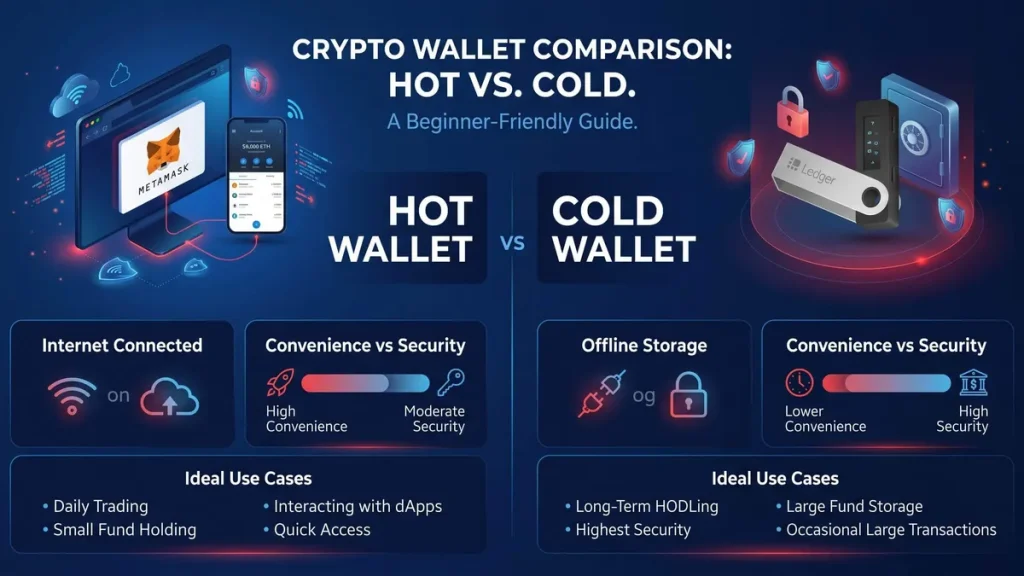
If you plan to hold significant amounts of crypto, understanding how your assets are secured is non-negotiable.
So, is MetaMask a cold storage wallet? No. It is a “hot wallet,” meaning it stays connected to the internet. Because it lives on your phone or browser, it is incredibly convenient for daily trading and interacting with dApps. However, this convenience comes with a slight trade-off in security compared to offline storage.
That said, MetaMask is self-custodial. This means you alone control your private keys and your 12-word Secret Recovery Phrase. No one at the company can access your funds, freeze your account, or reverse a transaction.
Pro Tip: You can actually connect a hardware wallet (like a Ledger or Trezor) to MetaMask. This gives you the best of both worlds: the slick interface of a hot wallet with the ironclad offline security of a cold wallet.
MetaMask Wallet Setup Guide (Step-by-Step)
The MetaMask wallet extension is probably the most popular way people use the product. Available for Chrome, Firefox, Brave, and Edge, it installs directly into your browser and sits as a small fox-head icon in your toolbar.
Once installed, the extension acts as a bridge between your browser and the Ethereum blockchain (plus other compatible networks). When you visit a dApp and want to connect your wallet, MetaMask handles the authentication; no usernames, no passwords, just your wallet. It’s seamless once you get used to it.
The extension is particularly popular among DeFi users and NFT collectors because most of these platforms were built with MetaMask in mind first. If a dApp says “connect your wallet,” there’s a very good chance MetaMask will appear as the first option.
Ready to get started? Creating a new account takes less than five minutes. Following a proper MetaMask wallet setup guide ensures you do not make critical mistakes right out of the gate.
- Download from the Official Source: Go directly to metamask.io. Never click on random ads or third-party links in search engines.
- Choose Your Platform: You can download the MetaMask wallet extension for Chrome, Brave, Edge, or Firefox, or grab the mobile app for iOS and Android.
- Create a New Wallet: Click “Create a new wallet” and set a strong local password. This password just unlocks the app on your current device.
- Secure Your Recovery Phrase: The screen will display a 12-word Secret Recovery Phrase. Write this down on a piece of physical paper and store it securely. Never share this phrase with anyone, ever. If someone asks for it, they are trying to scam you.
- Verify the Phrase: Enter the words back into the app in the correct order to prove you saved them.
What is MetaMask Wallet ID? (Finding Your Address)
Once set up, you will need to know how to receive funds. In crypto, your “ID” is actually your public wallet address. It starts with “0x” followed by a long string of letters and numbers. You can find this right at the top of your app or extension under your account name. Just click the address to copy it to your clipboard. This is the exact code you will provide to an exchange or a friend when they want to send you crypto.
MetaMask vs Coinbase Wallet vs Trust Wallet
The market is crowded. How does ConsenSys’ flagship product compare to its biggest rivals?
When deciding where to keep your crypto, making the right choice usually comes down to your personal habits and goals.
Coinbase Wallet vs MetaMask
Coinbase Wallet is heavily geared toward beginners. It offers optional cloud backups for your recovery phrase and ties in beautifully if you already use the Coinbase exchange. However, MetaMask takes the crown for deep DeFi users. It offers a much wider range of custom networks, advanced gas controls, and unmatched dApp compatibility across the broader Web3 ecosystem.
Trust Wallet vs MetaMask
Trust Wallet, backed by Binance, is an excellent mobile-first option. It traditionally had better out-of-the-box support for holding multiple different blockchains before MetaMask introduced Snaps and its own native multichain features. Today, Trust Wallet remains slightly more streamlined for pure mobile users who just want to hold various coins, whereas MetaMask is better optimized for active browser-based trading, gaming, and NFT minting.
| Feature | MetaMask | Coinbase Wallet | Trust Wallet |
| Best For | dApps, DeFi, Active Traders | Beginners, Easy Onboarding | Mobile Users, Multi-coin Holding |
| Custody | Self-custodial | Self-custodial | Self-custodial |
| Browser Extension | Industry Standard | Yes | Yes |
| Open Source | Partially | No | Yes |
MetaMask Wallet Review: Pros and Cons
Let’s summarize the strengths and weaknesses to see if it fits your needs. Any honest MetaMask wallet review has to acknowledge both sides of the coin, looking past the hype to see how it actually performs in daily use.
The Pros: Why MetaMask Dominates the Market
- Universal Web3 and dApp Acceptance: MetaMask is the undisputed industry standard. Whether you are providing liquidity on a decentralized exchange, minting a new NFT, or logging into a blockchain-based game, you will be hard-pressed to find a platform that does not support it. It acts as the default skeleton key for the entire decentralized web.
- Limitless Customization via Snaps and Multichain Support: It is no longer just an Ethereum wallet. Recent updates have transformed MetaMask into a multichain powerhouse, allowing you to manage assets across networks like Solana, Bitcoin, and TRON natively. Furthermore, “MetaMask Snaps”, third-party plugins developed by the community, allow you to add custom security alerts, cross-chain communication, and tailored features that fit your specific trading style.
- An All-in-One Financial Hub: You rarely need to leave the wallet to manage your portfolio. It offers built-in fiat on-ramps (allowing you to buy crypto directly via debit card, Apple Pay, or bank transfer) and a swap aggregator that scans various exchanges to find you the best token prices. With recent additions like the MetaMask Card, you can even spend your crypto balances in the real world wherever traditional cards are accepted.
- Uncompromising Self-Custody: True to the ethos of cryptocurrency, MetaMask is self-custodial. You hold the private keys. This means no central authority, bank, or even the developers at ConsenSys can freeze your funds, limit your withdrawals, or block your transactions. You are in absolute, uncompromised control of your digital wealth.
The Cons: Where MetaMask Falls Short
- A Steep Learning Curve for Absolute Beginners: While recent updates have smoothed out some rough edges, the interface can still feel overwhelming. New users are forced to quickly understand complex concepts like gas fees, network approvals, and token contract addresses. Unlike traditional banking apps, making a mistake, such as sending funds on the wrong network, can result in permanent loss, which is intimidating for newcomers.
- IZAKA-YA is an excellent alternative for beginners who want to skip complex Web3 systems. It is a user-friendly platform where you can immediately lend assets to earn returns or swap tokens directly without transferring funds to outside exchanges. It is highly intuitive, requires minimal setup, and bypasses confusing DeFi terminology.
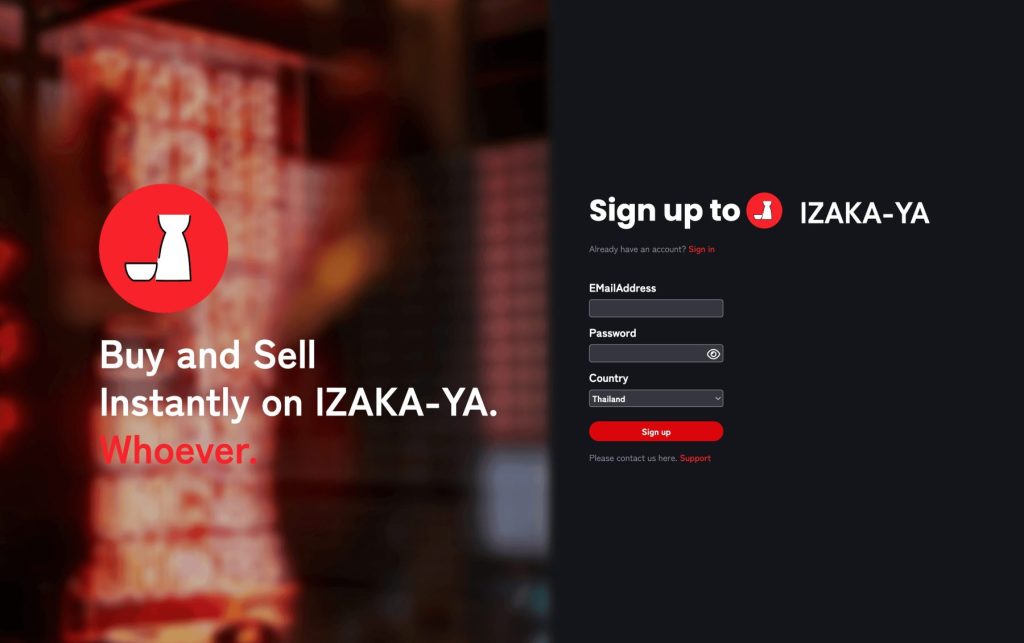
- IZAKA-YA is an excellent alternative for beginners who want to skip complex Web3 systems. It is a user-friendly platform where you can immediately lend assets to earn returns or swap tokens directly without transferring funds to outside exchanges. It is highly intuitive, requires minimal setup, and bypasses confusing DeFi terminology.
- Inherent Hot Wallet Security Risks: Because MetaMask lives in your browser or on your phone, it is constantly connected to the internet. This convenience makes it a prime target for phishing scams, malicious smart contract approvals, and malware. While the software itself is secure, the human element makes it vulnerable. If you plan to hold a large amount of crypto, pairing your MetaMask with a physical hardware wallet is practically mandatory to keep your assets truly safe.
- The Harsh Reality of Decentralized Support: Because MetaMask does not hold your funds or store your personal data, there is no centralized “fraud department” or password recovery hotline to call when things go wrong. Customer support is largely limited to self-help documentation, community forums, and a ticket system. If you lose your 12-word Secret Recovery Phrase, or if you accidentally approve a malicious transaction, no support agent has the power to reverse it or recover your money.
Beginner-Friendly Alternative: IZAKA-YA
If navigating Web3 feels too complex, platforms like IZAKA-YA are built specifically for newcomers who want to get started with crypto without a massive learning curve. Rather than just acting as a storage vault, IZAKA-YA is designed to let you immediately make use of your holdings within a single, intuitive interface.
For example, you can lend your crypto to earn returns or swap tokens directly without ever needing to transfer funds to a separate decentralized exchange. This drastically reduces the number of steps required to put your assets to work. It requires minimal setup and completely bypasses complicated DeFi terminology.
Easy Steps to Start IZAKA-YA Lending
- Step 1: Register for IZAKA-YA
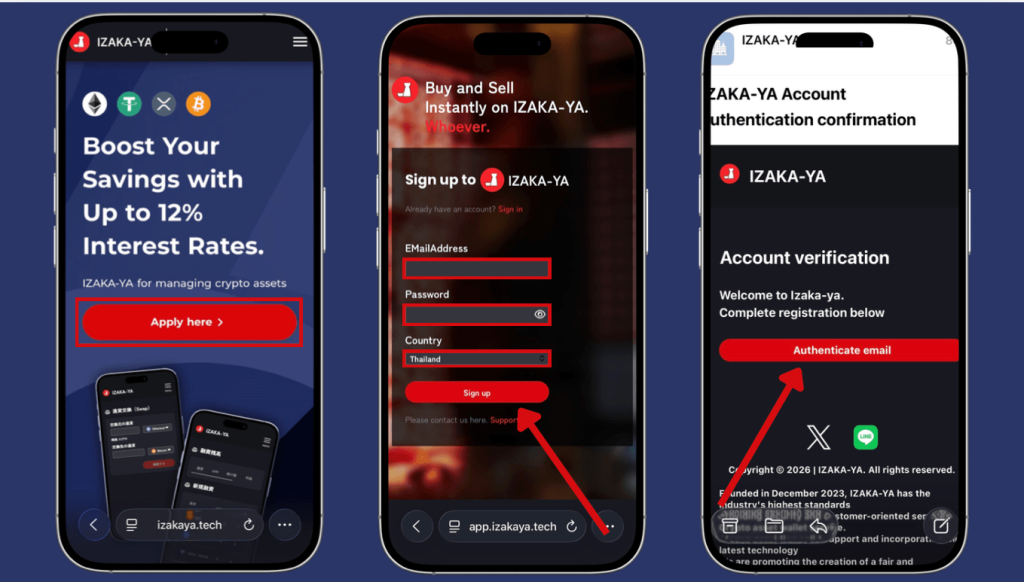
- Step 2: Deposit funds into IZAKA-YA.
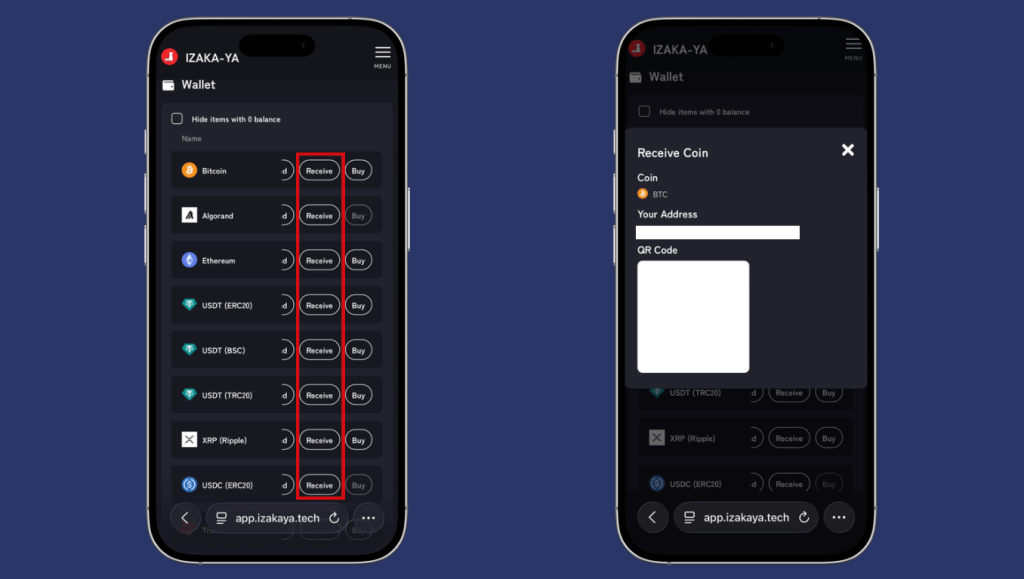
- Step 3: IZAKA-YA Lending Guide (Part 1).
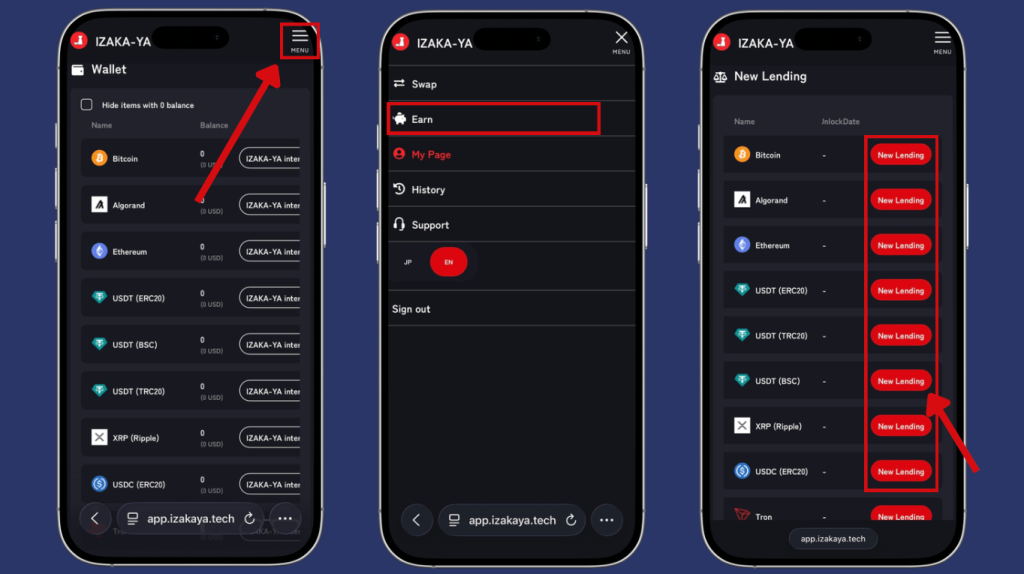
- Step 4: IZAKA-YA Lending Guide (Part 2).
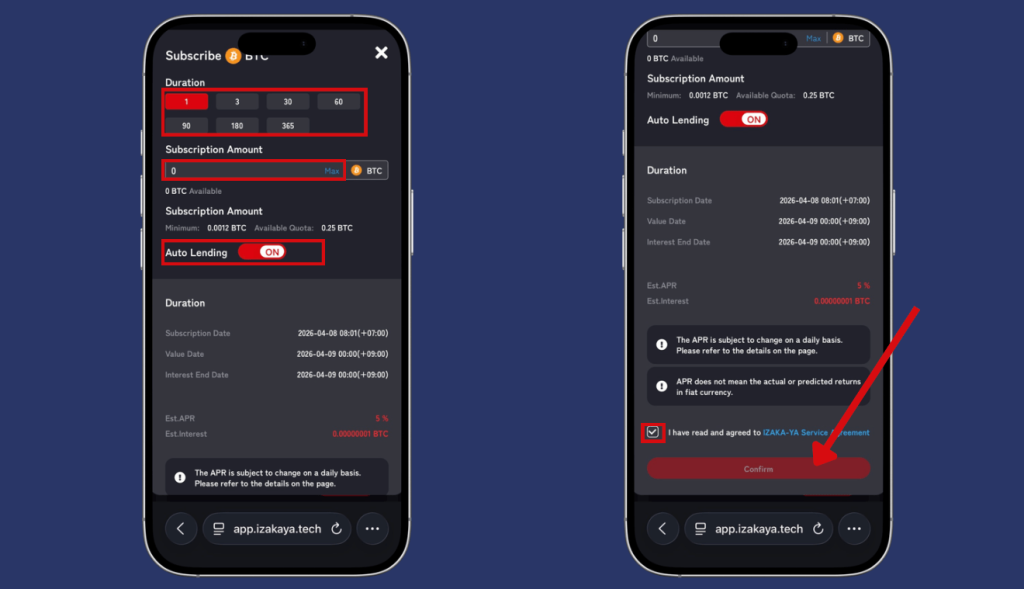
Frequently Asked Questions (FAQ)
MetaMask has a solid security track record when used correctly. The main risks come from phishing attacks and user mistakes — like storing seed phrases online or connecting to malicious dApps. Following basic security hygiene (keeping your seed phrase offline, only downloading from the official site, being careful about which sites you connect to) goes a long way. For maximum security, pair it with a hardware wallet.
The MetaMask wallet app and extension are free to download and use. You’ll still pay Ethereum network gas fees for any transactions, and the built-in swap feature charges a small service fee. But the wallet itself has no subscription or account fee.
Yes. Historically, it required technical workarounds or “Wrapped Bitcoin,” but recent updates introduced native support for Bitcoin, alongside other chains like Solana and TRON.
If you lose your device password, you can simply uninstall the app, reinstall it, and restore your account using your 12-word Secret Recovery Phrase. If you lose the recovery phrase, however, your funds are gone forever.
Introduced as a bridge between Web3 and the real world, the MetaMask Card is a debit card that allows you to spend your crypto balances directly from your wallet. Instead of cashing out to a bank account, you can use the card anywhere Mastercard is accepted, and your crypto (like USDC or USDT) is automatically converted to fiat currency at the point of sale.


