
- Leaving your cryptocurrency on an exchange might feel convenient, but it is rarely the safest choice. If you are holding assets for the long term, moving them off the exchange and into a dedicated XRP wallet is the first step toward true ownership. Taking control of your private keys means nobody can freeze your account or mismanage your funds.
Whether you are trying to clean up a messy portfolio of altcoins or simply want to lock away your investments securely, choosing the right storage method matters. Let’s break down how to evaluate your options and find the perfect fit for your specific needs.
What Actually is a Ripple XRP Wallet?
Understanding how crypto storage works can save you a lot of stress down the road. A ripple XRP wallet doesn’t actually “hold” your coins the way your leather wallet holds cash. Your XRP always lives on the XRP Ledger (the blockchain). Instead, the wallet stores your private keys, the complex cryptographic passwords that prove you own those specific coins and allow you to send them.
Think of the wallet as your personal interface to the blockchain. If you lose your keys, you lose access to the funds. If someone else gets your keys, they can take your crypto. That is why choosing a reliable provider is crucial.
Hot vs. Cold Storage: Finding the Best Crypto Wallet for XRP
Before downloading random software, you need to decide between convenience and maximum security. The crypto world generally divides storage into two main categories: hot wallets and cold wallets.
Feature
Hot Storage (Software Wallets)
Cold Storage (Hardware Wallets)
Connection
Always connected to the internet
Completely offline
Best For
Frequent trading, daily use, beginners
Long-term holding, high-value portfolios
Security Level
Moderate (vulnerable to malware)
Very High (immune to online hacks)
Cost
Usually free
US$50 – US$200+
If you plan to actively trade or move funds around frequently, a software option makes sense. However, if your primary goal is to buy and forget, a hardware device is easily the best crypto wallet for XRP.
Software Wallets (Hot Storage)
Software wallets come as mobile apps, desktop programs, or browser extensions. They are highly accessible and perfect for managing smaller amounts of crypto on the go. While they are generally secure, the fact that they live on internet-connected devices means they carry a slightly higher risk of exposure to phishing attacks or malware.
Hardware Wallets (Cold Storage)
Hardware wallets are physical devices that look similar to a USB thumb drive. They generate and store your private keys completely offline. When you want to make a transaction, you connect the device to your computer or phone and physically press a button to approve it. Hackers cannot steal your keys through the internet because the keys never leave the physical device.
For users who want to keep their assets secure while still putting idle crypto to work, some investors also combine self-custody wallets with trusted lending platforms like IZAKA-YA to earn passive yield without leaving all of their funds sitting on an exchange.

Top Contenders for the Best XRP Wallet
There is no single perfect solution for everyone, but a few standout options consistently dominate the market. We have gathered some of the top choices currently available for you.
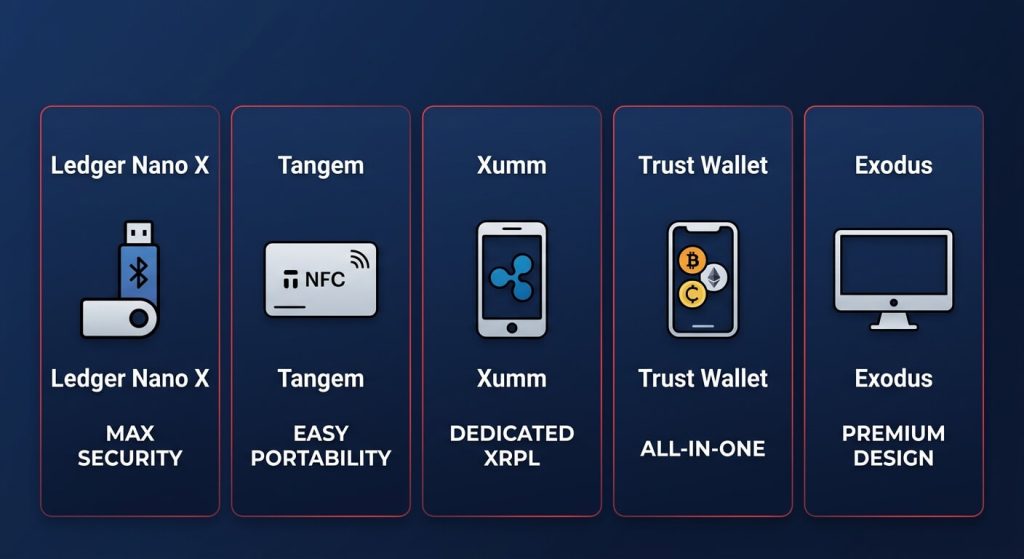
Ledger Nano X: The Best Wallet for XRP Security

When it comes to hardware security, Ledger wallet is the industry standard. The Nano X is a premium device that connects to your phone via Bluetooth, allowing you to manage your funds securely while on the move. It supports thousands of different cryptocurrencies, making it ideal if you are holding XRP alongside Bitcoin, Ethereum, or other altcoins. For absolute peace of mind, this is widely considered one of the best wallets for XRP.
Pros:
- Cold Storage Security: Your keys never touch the internet, providing the highest level of protection.
- Bluetooth Connectivity: You can manage your assets on your phone via the Ledger Live app without needing cables.
- Multi-Asset Support: It manages thousands of different coins (BTC, ETH, etc.) alongside XRP.
Cons:
- Cost: It is one of the more expensive options on the market.
- Small Interface: Navigating menus with two physical buttons and a tiny screen can feel a bit “old school” for some.
Who is it for? The “Security-First” holder who has a significant amount of crypto and wants the peace of mind that comes with industry-standard hardware.
Xaman: The Dedicated XRP Wallet App
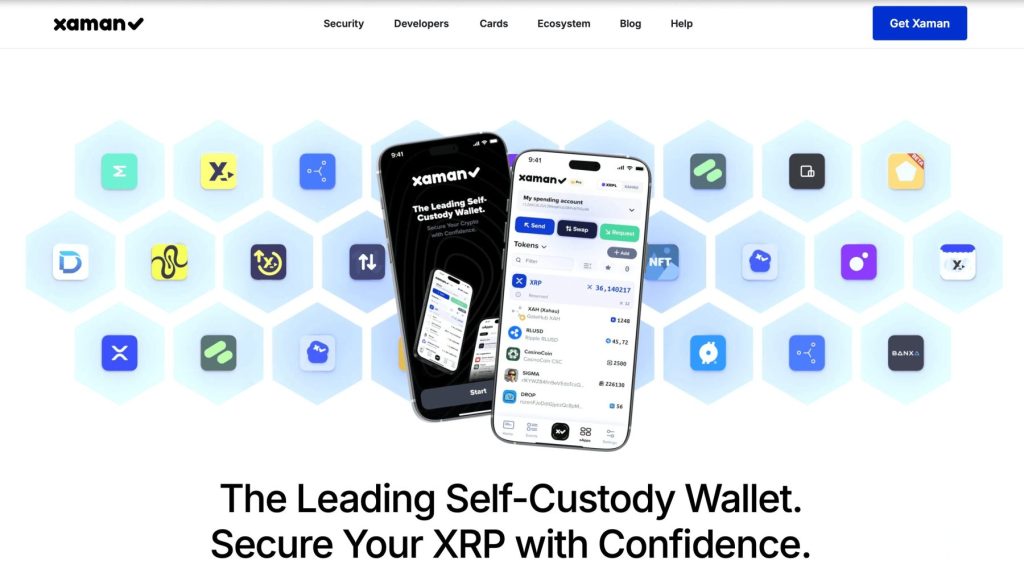
If you want an ecosystem built specifically around the XRP Ledger, Xaman, previously known as Xumm, is the clear winner. Unlike multi-coin wallets, Xaman is hyper-focused on Ripple’s network. It allows you to interact with decentralized applications (dApps) on the XRP Ledger, issue your own tokens, and set up advanced trust lines. It is arguably the best xrp wallet for users who want to dive deep into the specific features of the Ripple network rather than just holding the coin.
Pros:
- XRPL Native: Supports advanced features like trust lines, the Decentralized Exchange (DEX), and NFT management.
- Fast & Integrated: Seamlessly interacts with dApps built on the XRP network.
- Non-Custodial: You own your keys, but the app makes complex blockchain tasks feel easy.
Cons:
- XRP Focused Only: You cannot store Bitcoin or Ethereum here; it is strictly for the XRP ecosystem.
- Hot Wallet Risk: Since it lives on your phone, it is theoretically more vulnerable than a hardware device if your phone is compromised.
Who is it for? The “DeFi Refugee” or XRP enthusiast who wants to trade, collect NFTs, and participate in the ecosystem rather than just watching the price.
Trust Wallet: The All-in-One Mobile Option
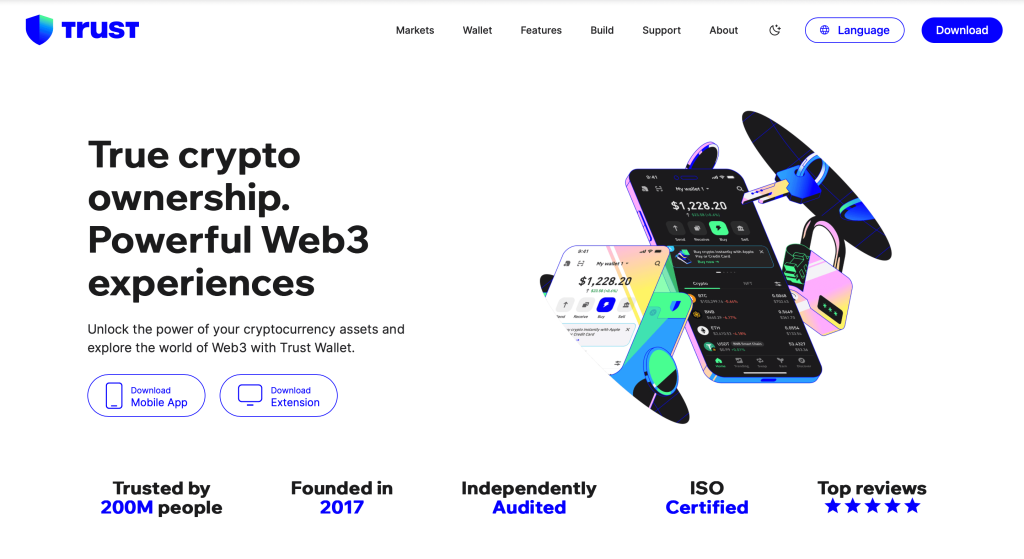
For those who prefer a software solution that handles a massive variety of coins, Trust Wallet is incredibly popular. Backed by Binance, this xrp wallet app is user-friendly, completely free, and offers a clean interface for beginners. It allows you to buy, swap, and store your crypto all from your smartphone.
Pros:
- Massive Variety: Supports over 70 blockchains and millions of tokens.
- User-Friendly: The UI is clean, modern, and very easy for a beginner to navigate.
- Free: There are no upfront costs to download and use the app.
Cons:
- Standard Security: Like all software wallets, it is “hot,” meaning it is connected to the internet and requires strict personal security habits.
Who is it for? The “Altcoin Bagholder” or beginner who wants a single, free app to manage a diverse portfolio of XRP and other random tokens.
Exodus Wallet: The Best Desktop Experience
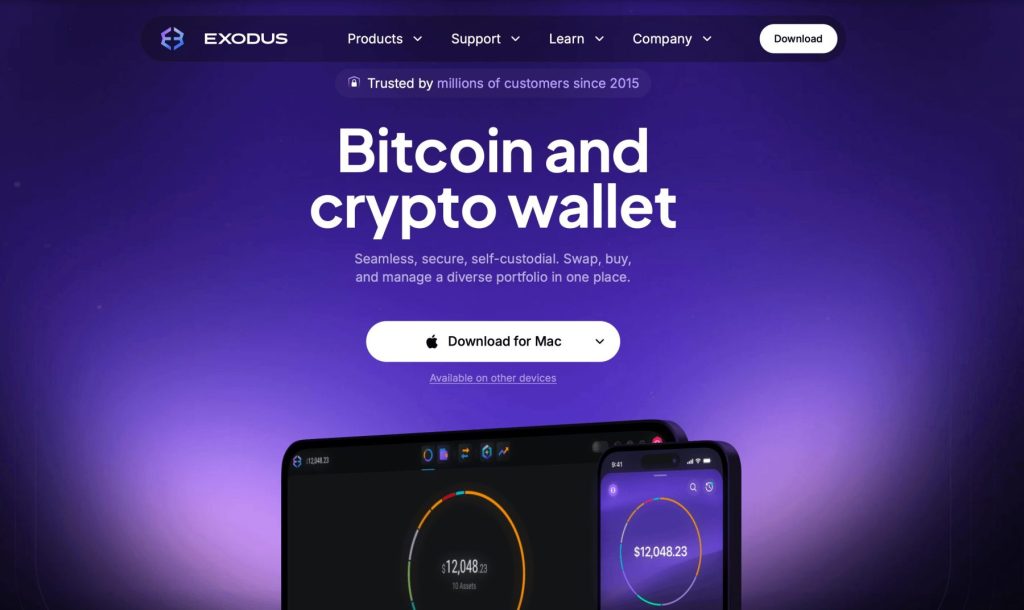
For users who prefer managing their crypto on a computer rather than a phone, Exodus wallet offers one of the most visually appealing and intuitive interfaces in the industry. It is a software wallet available on both desktop and mobile, supporting hundreds of different assets. While it is a hot wallet, Exodus integrates seamlessly with Trezor hardware devices, allowing you to upgrade to cold storage later without having to learn a completely new software interface.
Pros:
- Premium UI: Features stunning charts and a very intuitive “one-click” exchange feature.
- Trezor Partnership: You can link it to a Trezor hardware wallet to get the beauty of Exodus with the security of cold storage.
- Cross-Platform: Syncs seamlessly between your desktop and mobile devices.
Cons:
- Closed Source: Unlike some competitors, parts of its code are not open for public audit.
- Higher Swap Fees: The convenience of the built-in exchange often comes with higher transaction spreads.
Who is it for? The “Visual HODLer” who prefers a large desktop screen and wants a premium, fintech-style dashboard for their investments.
Tangem Wallet: The Most Convenient Hardware Alternative

If you want hardware security without the bulk of a traditional USB-style device, Tangem is a brilliant solution. Shaped exactly like a standard bank card, this cold storage wallet uses NFC technology to communicate directly with your smartphone. There are no batteries to charge, no cables to plug in, and no small screens to navigate. You simply tap the card to the back of your phone to sign and approve transactions.
Pros:
- Ultra-Portable: No battery, no screen, and no cables. It fits right in your physical wallet.
- Simple NFC Use: Just tap the card to your phone to sign a transaction—it feels like using Apple Pay.
- Durable: It is water and dust-resistant, making it physically tougher than most electronics.
Cons:
- No Screen: You have to trust your phone screen to show the correct address, as the card itself cannot display transaction details.
- NFC Required: If your phone’s NFC is finicky, the wallet becomes a paperweight until you get a new device.
Who is it for? The “Minimalist” who wants hardware-grade security without the technical friction of a standard USB-style wallet.
Wallet
Storage Type
Top Benefit
Biggest Drawback
Best For…
Ledger Nano X
Hardware (Cold)
Maximum security with Bluetooth
High price tag (~US$150)
Big portfolios & long-term holders
Tangem Wallet
Hardware (Cold)
Tap-to-use card, highly portable
Needs a phone (NFC), no screen
Convenient, everyday cold storage
Xaman
App (Hot)
Unlocks full XRP network features
Only holds XRP-related coins
Dedicated Ripple & XRPL users
Trust Wallet
App (Hot)
Free, simple, massive coin list
Always online (lower security)
Beginners needing an all-in-one app
Exodus
Desktop/App (Hot)
Stunning design, easy to read
High fees for in-app trades
Desktop users who value a clean layout
How to Set Up Your Wallet
Getting started is less intimidating than it seems. While the exact steps vary slightly depending on the provider, the core process remains the same.
- Step 1: Download or Purchase. Always download apps from the official website or official app stores. If buying a hardware wallet, purchase directly from the manufacturer to avoid tampered devices.
- Step 2: Create a New Wallet. Open the app or connect your device and select the option to create a new wallet.
- Step 3: Secure Your Seed Phrase. The wallet will generate a 12 to 24-word “seed phrase.” Write this down on a piece of paper and hide it somewhere safe. Never take a screenshot or save it in a cloud drive. This phrase is your ultimate backup—if you lose your device, this phrase recovers your funds.
- Step 4: Transfer Your XRP. Once set up, find your XRP “receive” address (it looks like a long string of letters and numbers starting with ‘r’). Copy this address, go to the exchange where your XRP is currently sitting, and withdraw your funds to that address. Always send a small test transaction first to ensure everything works.
Beyond Storage: Making Your XRP Work for You
Choosing the right wallet is only one part of building a smart long-term crypto strategy. Once your XRP is securely stored, many investors also look for ways to generate passive income from their holdings instead of letting assets sit idle.
Platforms like IZAKA-YA are designed for crypto users who want access to lending opportunities while still prioritizing flexibility and asset management. Rather than keeping everything on centralized exchanges, users can combine secure self-custody practices with lending strategies to potentially earn yield on dormant crypto holdings.
For long-term holders, the ideal setup often looks like this:
- Hardware wallet for long-term cold storage
- Mobile wallet for daily transactions and ecosystem access
- Lending platforms for generating passive returns on unused assets
The key is balancing security, accessibility, and capital efficiency based on your personal risk tolerance and investing style.
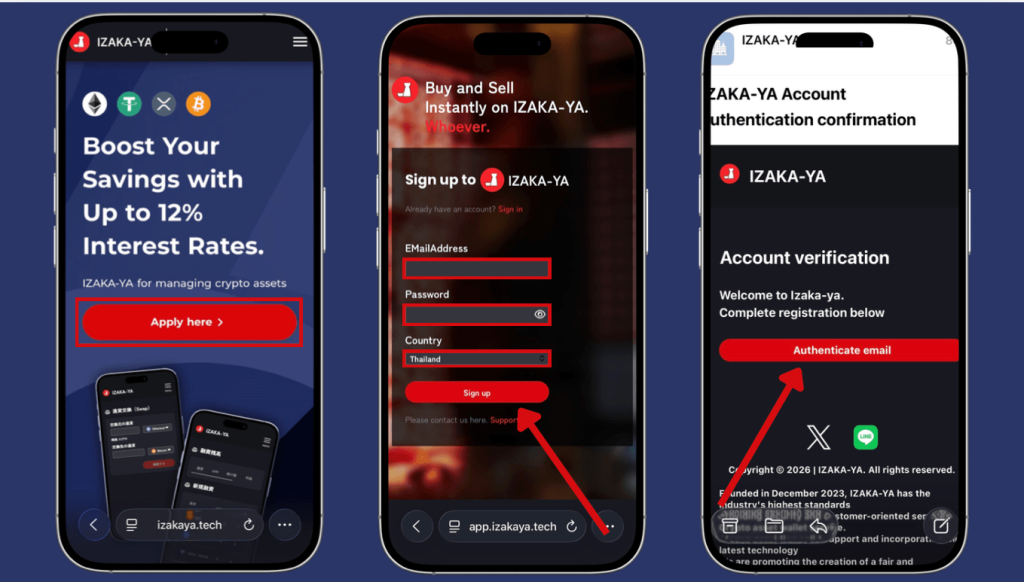
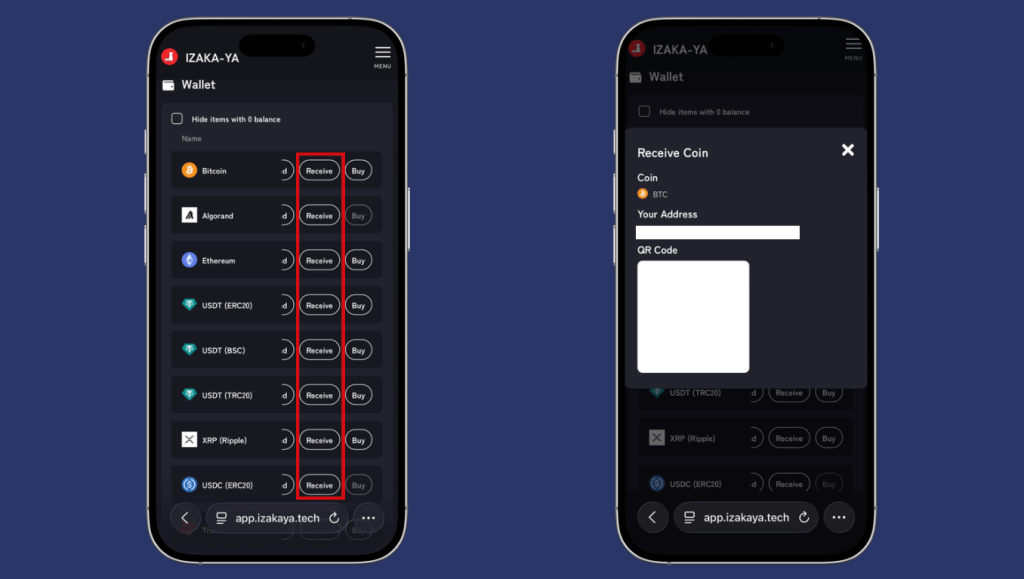
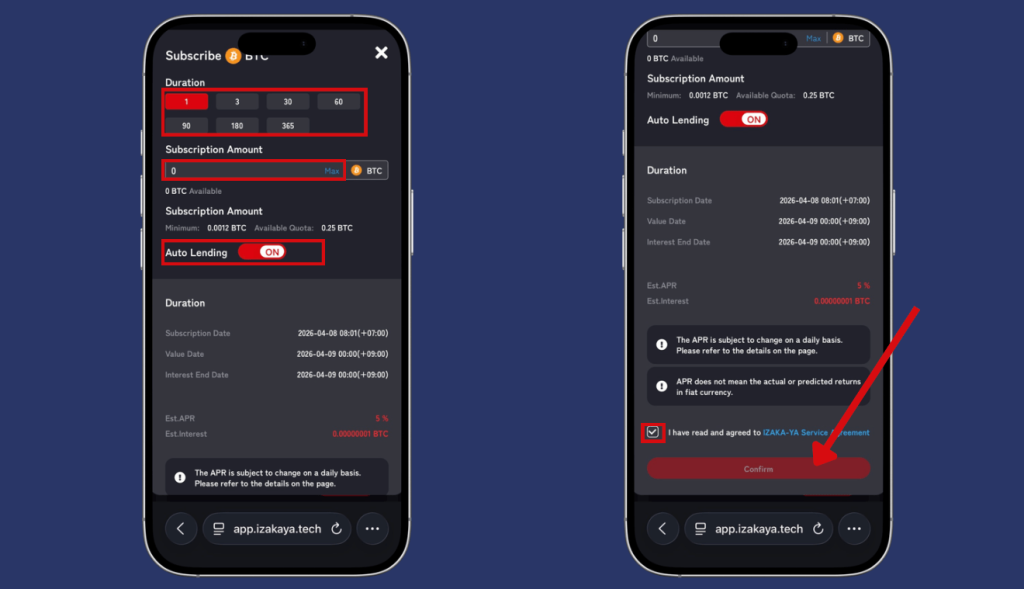
Easy Steps to Start IZAKA-YA Lending
- Step 1: Register for IZAKA-YA
- Step 2: Deposit funds into IZAKA-YA.
- Step 3: IZAKA-YA Lending Guide (Part 1).
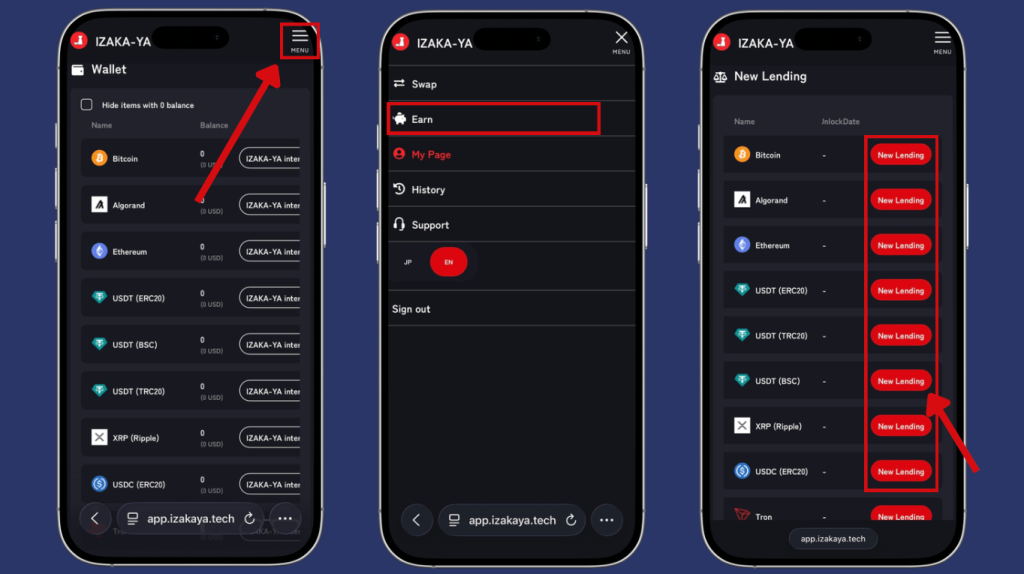
- Step 4: IZAKA-YA Lending Guide (Part 2).
Frequently Asked Questions (FAQ)
No. You can buy XRP directly on most cryptocurrency exchanges. However, using your own wallet gives you full control over your crypto and is generally safer for long-term storage.
Some wallets, like Exodus, allow you to sync across desktop and mobile devices. Others are designed specifically for mobile or hardware use only.
It depends on the wallet. Hardware devices like Ledger and multi-coin apps like Trust Wallet support thousands of assets. Dedicated apps like Xaman are designed specifically for the XRP Ledger and its native tokens.
While major exchanges have improved their security, leaving funds there means you do not control the private keys. If the exchange faces legal trouble, bankruptcy, or a massive hack, your funds could be frozen or lost. Self-custody is always recommended for long-term holdings.
Always double-check the wallet address before sending funds and start with a small test transaction first. XRP transactions are usually fast, but sending funds to the wrong address or network can result in permanent loss. Using a trusted wallet provider and carefully verifying transaction details greatly reduces risk.