
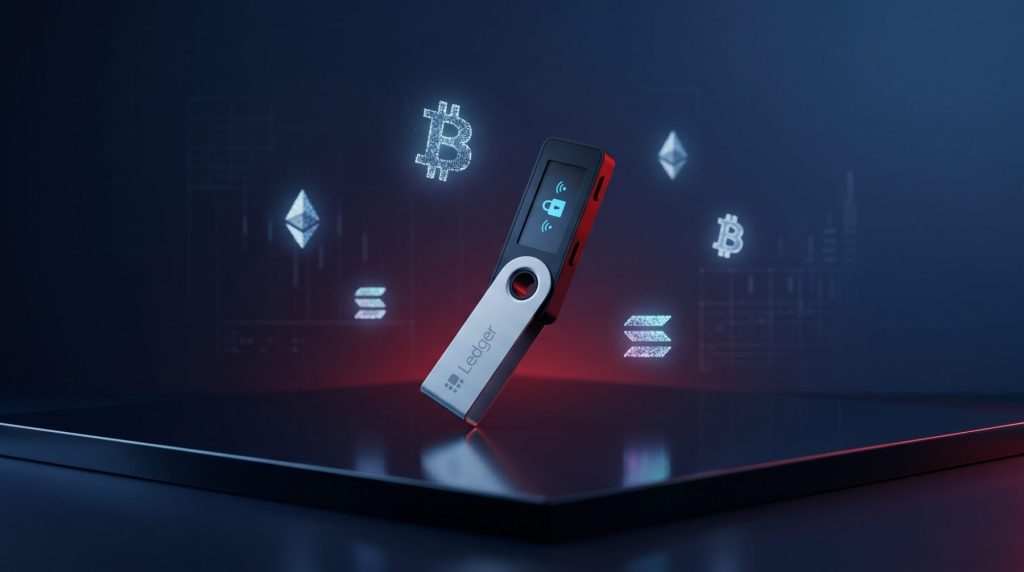
You have probably heard of this phrase: “Not your keys, not your coins.” Leaving your funds on a centralized exchange can be risky. This is exactly where a ledger wallet steps in. By providing offline security, a Ledger crypto wallet gives you total ownership and control over your Bitcoin, Ethereum, and other digital currencies.
The Basics: What Is Ledger Wallet?
Crypto storage does not have to be complicated. If you are asking what ledger wallet is, it is a specialized physical device, similar to a USB drive, that generates and stores your cryptocurrency private keys or your digital passwords entirely offline.
The device was born in Paris in 2014 after early crypto investors lost millions to online exchange hacks. To solve this vulnerability, Ledger’s founders integrated the same highly secure microchips used in modern passports into a consumer-friendly hardware wallet.
Many beginners naturally wonder, is ledger a cold wallet? The answer is Yes. By keeping your private keys offline, cold wallets ensure your assets remain invisible to internet hackers.
Because of this, you cannot simply click a button on your computer to move funds. You must physically hold the Ledger device and press its manual buttons to approve any transfer, creating an unbreakable physical barrier between your crypto and potential threats.
Ledger supports thousands of cryptocurrencies, including:
- Bitcoin (BTC)
- Ethereum (ETH)
- Solana (SOL)
- XRP
- Cardano (ADA)
- Stablecoins and ERC-20 tokens
How Does a Ledger Crypto Wallet Work?
Before understanding Ledger specifically, it helps to understand how crypto wallets actually work.
Your coins are not physically stored inside the wallet. Instead, the wallet stores your private keys, which are required to access and approve transactions on the blockchain.
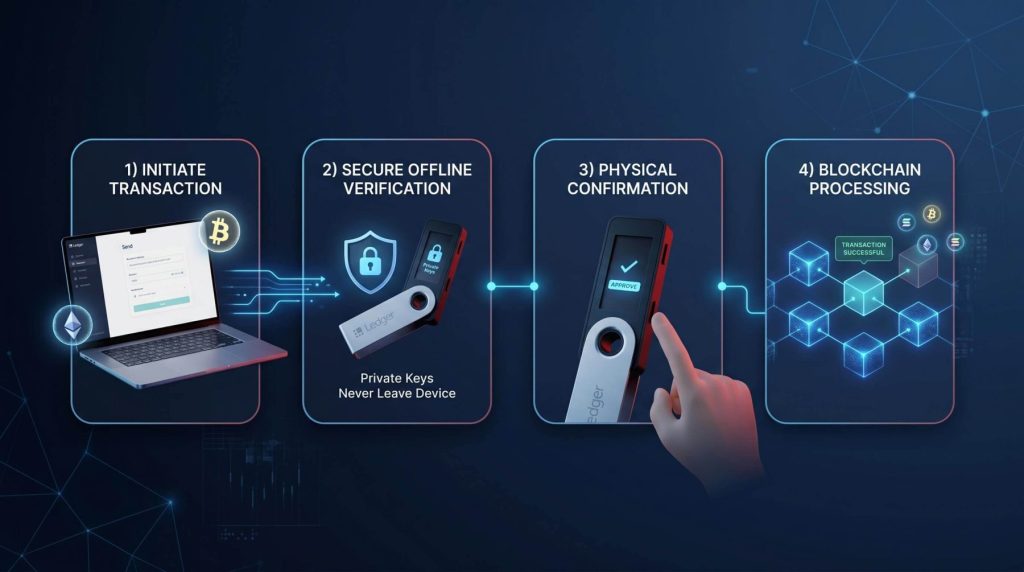
A Ledger crypto wallet works by:
- Generating private keys offline
- Keeping those keys isolated inside the device
- Requiring physical confirmation before transactions are approved
This means even if your computer gets infected with malware, hackers still cannot access your funds without the physical Ledger device and recovery phrase.
Why Does a Cold Wallet Matter?
Hot wallets are undeniably convenient, but their constant connection to the internet makes them highly vulnerable to phishing attacks, malicious browser extensions, and malware. A cold wallet setup reduces that risk significantly because your private keys never leave the physical hardware device. For long-term holders, this completely offline layer of security can make a massive difference in protecting your investments.
While researching this extra layer of security, you will likely see the terms ‘hardware wallet’ and ‘cold wallet’ used interchangeably. However, there is actually a slight distinction between the two:
- Cold Wallet: This is the broad category, much like the word “vehicle.” It refers to any method of storing crypto offline. For example, simply writing your password on a piece of paper and locking it in a safe is technically a cold wallet.
- Hardware Wallet: This is a specific physical device within that category, much like a “car.”
Simply put, all hardware wallets are cold wallets, but not all cold wallets are hardware wallets. In everyday crypto conversations, however, people use both terms to mean the exact same thing.
Device Breakdown: Our Comprehensive Ledger Wallet Review
Choosing the right hardware depends entirely on your budget, your technical needs, and how often you trade. This review will highlight that the company offers several different models tailored to different types of users.
Ledger Nano S Plus Wallet: Best for Beginners
The Ledger Nano S Plus wallet is the entry-level option, making it perfect for those new to the crypto space who want top-tier security without a hefty price tag.
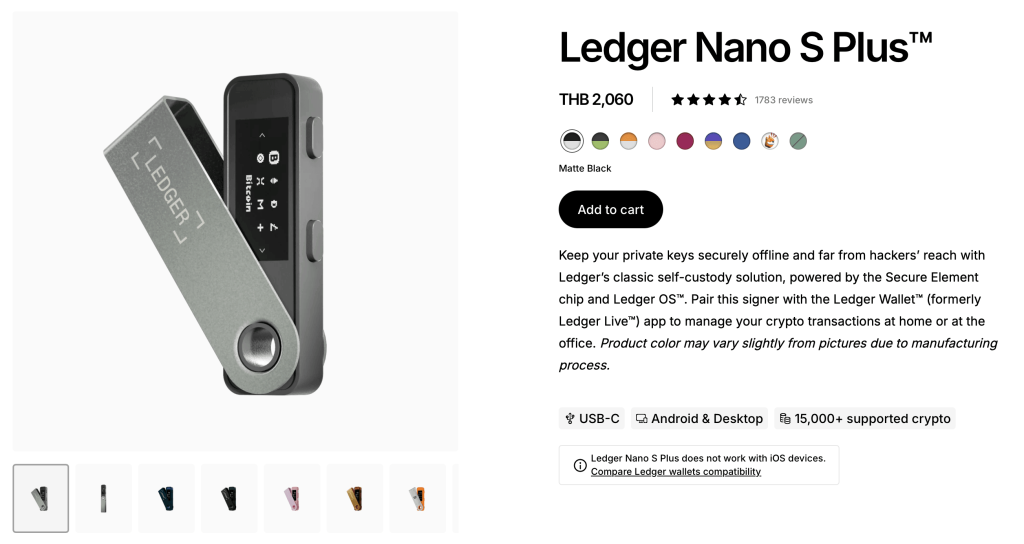
- Pros: It is highly affordable (retailing around $59). Despite the lower price, it uses the exact same CC EAL6+ secure element chip found in the most expensive models. It also boasts 1.5MB of storage, allowing you to install multiple blockchain apps simultaneously to manage thousands of tokens.
- Cons: It lacks Bluetooth and an internal battery. This means you must use a USB-C cable to connect it to your computer or Android phone. It also does not support iOS devices.
- The Verdict: This is the ultimate “buy and hold” device. If your goal is to simply buy Bitcoin or Ethereum and lock it away for years, you do not need anything more advanced than this.
Ledger Nano X Wallet: Best for Mobile Users
If you are someone who likes to trade on the go, the Ledger Nano X wallet is likely your best bet.
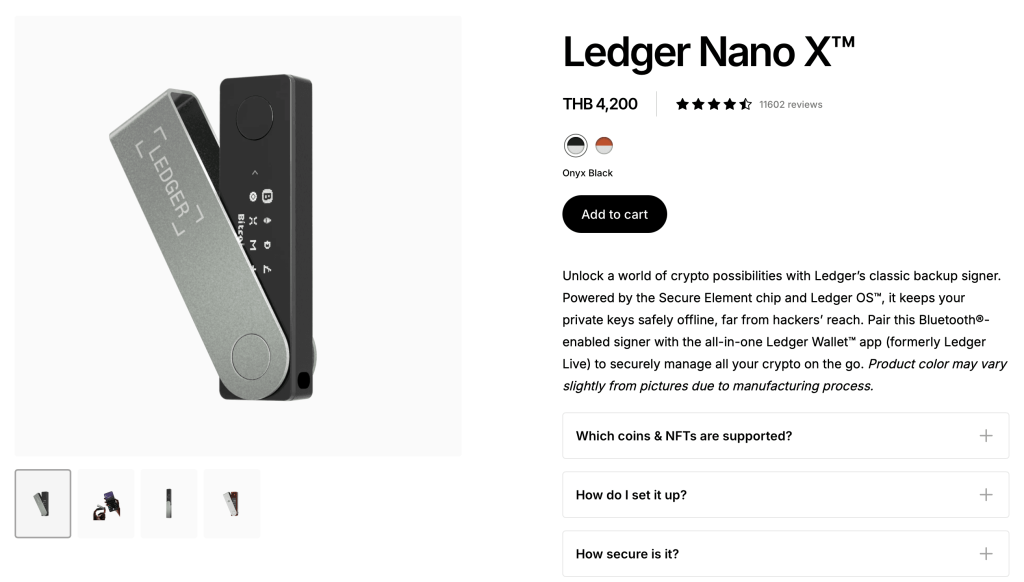
- Pros: It includes Bluetooth Low Energy (BLE 5.2) functionality, allowing you to connect wirelessly and seamlessly to the Ledger Live app on both iPhone and Android. It also features a 100 mAh battery (giving you hours of untethered use) and 2.0MB of storage space, which is enough to hold up to 100 different apps at the same time.
- Cons: At roughly $99 to $149 depending on the retailer, it costs noticeably more than the Nano S Plus.
- The Verdict: If you read through various Ledger Nano X wallet reviews online, you will consistently see users praising the convenience of wireless mobile trading. It is perfect for active investors who want to interact with decentralized finance (DeFi) apps directly from their smartphones.
Ledger Flex Wallet: The Premium Touchscreen Experience
For users who want a next-generation visual experience, the Ledger Flex wallet brings high-end features to the table. Released to bridge the gap between traditional stick designs and ultra-premium models, it is a game changer for usability.
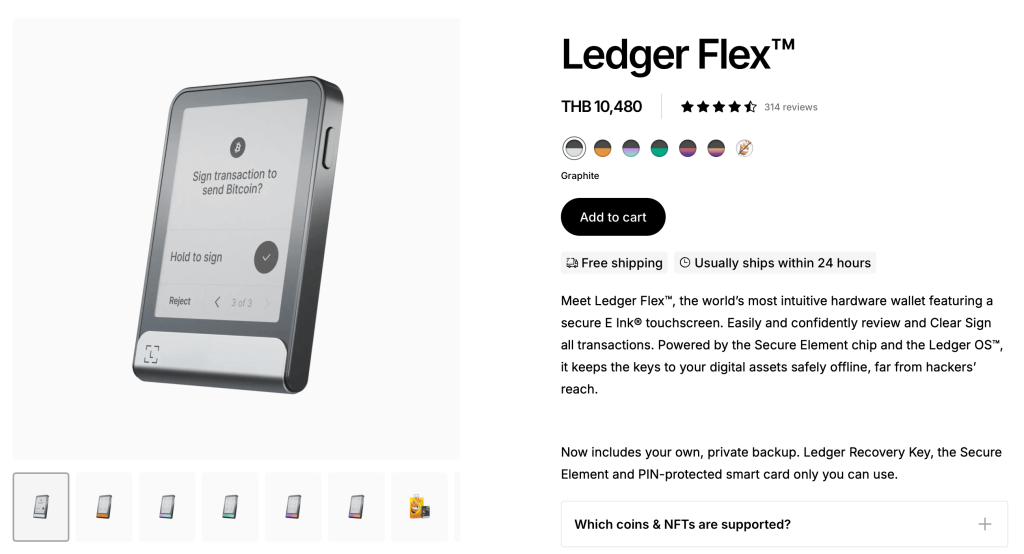
- Pros: It completely removes physical buttons, utilizing a 2.84-inch monochrome E-Ink touchscreen. This allows for incredibly clear transaction signing, known as “clear signing,” where you can visually verify exactly what a smart contract is doing before approving it. It features a premium aluminum build, Bluetooth, and built-in NFC capabilities for rapid mobile pairing.
- Cons: Priced at $249, it is a significant investment. It might be overkill if you just want to hold a small amount of cryptocurrency.
- The Verdict: The Flex is ideal for heavy Web3 users, NFT collectors, and anyone who prefers the intuitive feel of a smartphone screen over clicking small plastic buttons.
Software Check: Ledger vs Exodus Wallet Comparison
Hardware is just one part of the crypto equation. You also need software to view your balances. Below is a quick ledger vs exodus wallet comparison to help you understand the differences between hardware and software storage.
| Feature | Ledger Wallet (Hardware) | Exodus Wallet (Software) |
| Storage Type | Cold (Offline) | Hot (Online) |
| Security | Extremely High | Moderate (Depends on your computer’s security) |
| Cost | Paid (Hardware device required) | Free to download |
| Best For | Long-term holding and large amounts | Daily trading and small amounts |
Interestingly, you can actually connect your Ledger device to the Exodus interface. This gives you the beautiful design of Exodus while maintaining the strict security of a cold wallet setup.
Security Truths: Was the Ledger Wallet Hacked?
No tech company is perfect, and security is always a moving target. A very common question is whether the ledger wallet hacked rumors are true.
Here is the factual breakdown: The physical hardware devices (the secure element chips that hold your private keys) have never been hacked remotely. Your funds remain safe as long as you never type your 24-word recovery phrase into a computer or give it to anyone.
However, Ledger as a company has suffered data breaches. In 2020 and again through a third-party partner in 2026, customer personal data was leaked. This resulted in targeted phishing emails where scammers tried to trick users into handing over their recovery phrases.
The lesson here is simple: always buy directly from the official manufacturer and remain highly cautious of any unexpected emails asking for your crypto credentials.
Who Should Use a Ledger Cold Wallet?
A Ledger cold wallet can be useful for more people than you might think. You do not need to be a crypto expert or full-time trader to benefit from better security.
If you are the type of person who buys Bitcoin or Ethereum and simply holds it for years without actively trading, a Ledger wallet helps reduce the risk of leaving your assets on exchanges for too long. Many long-term holders only start thinking about self-custody after hearing about exchange freezes or hacks, but moving funds into cold storage earlier can provide much better peace of mind.
For altcoin holders, Ledger is also attractive because it supports a wide range of blockchains and tokens. If your portfolio includes assets across Ethereum, Solana, XRP, or other ecosystems, managing everything in one secure place becomes much easier. This is one reason why many crypto platforms, including IZAKA-YA, often encourage users to explore proper wallet security early instead of relying entirely on centralized platforms.
Even casual crypto investors can benefit from understanding how cold wallets work. You may not need one immediately, but learning about wallet security early can save a lot of stress later on.
A Beginner-Friendly Alternative for Getting Started With Crypto
While hardware wallets like Ledger and Trezor wallet are popular for long-term self-custody and advanced security, they may not always feel beginner-friendly for first-time crypto users. Managing recovery phrases, wallet connections, and DeFi protocols can still feel overwhelming, especially for people who simply want an easier way to start using their crypto.
IZAKA-YA is designed for users who want a more accessible entry point into crypto without needing to learn complex systems from day one. Instead of requiring users to move funds across multiple platforms, the wallet allows users to manage and use their assets within a single ecosystem.
Easy Steps to Start IZAKA-YA Lending
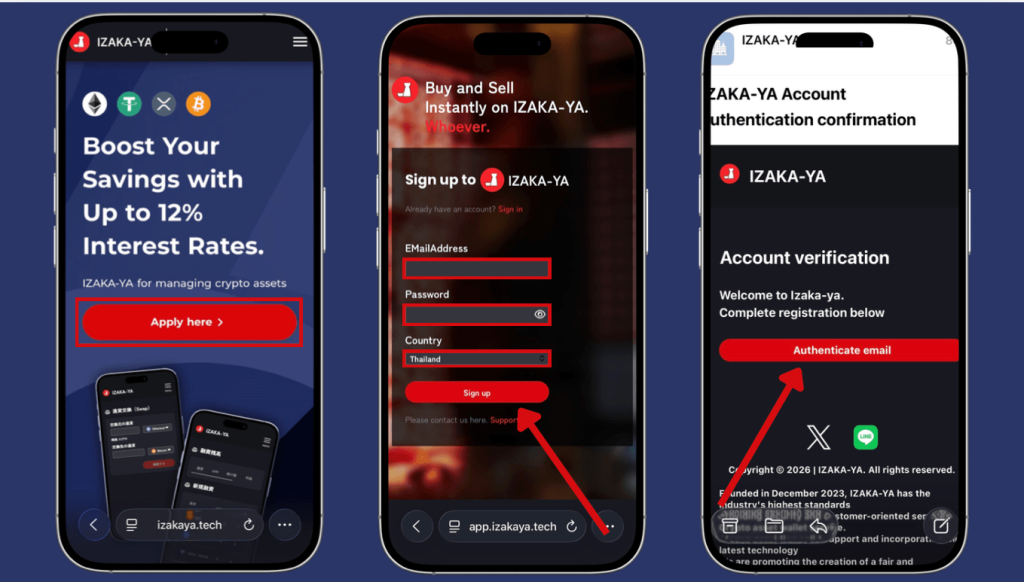
- Step 1: Register for IZAKA-YA
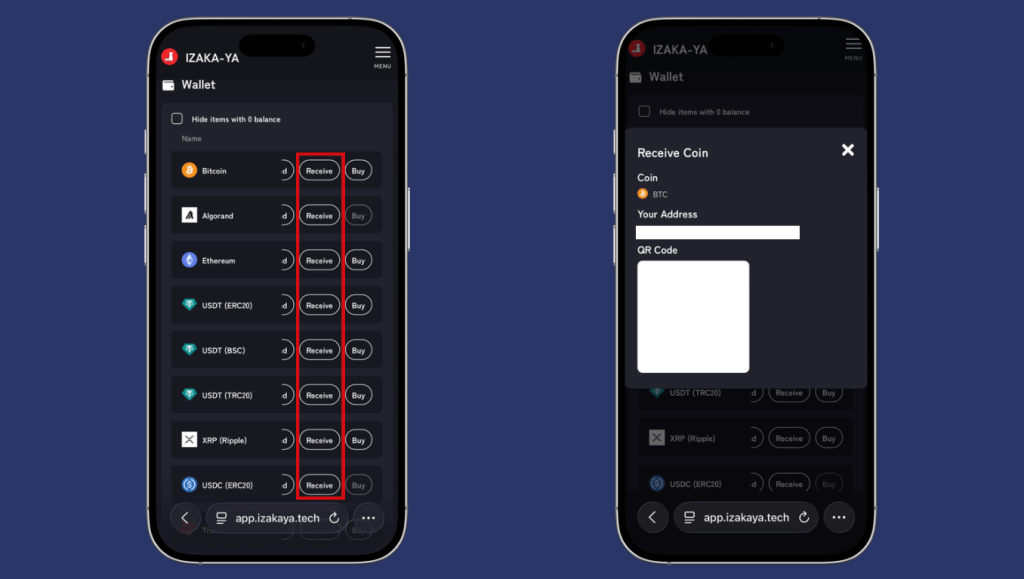
- Step 2: Deposit funds into IZAKA-YA.
- Step 3: IZAKA-YA Lending Guide (Part 1).
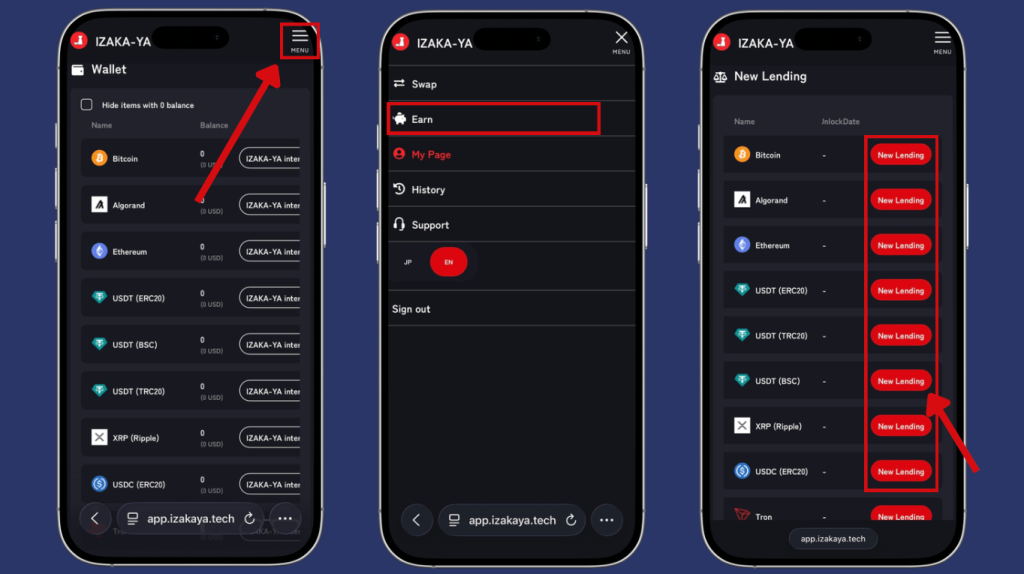
- Step 4: IZAKA-YA Lending Guide (Part 2).
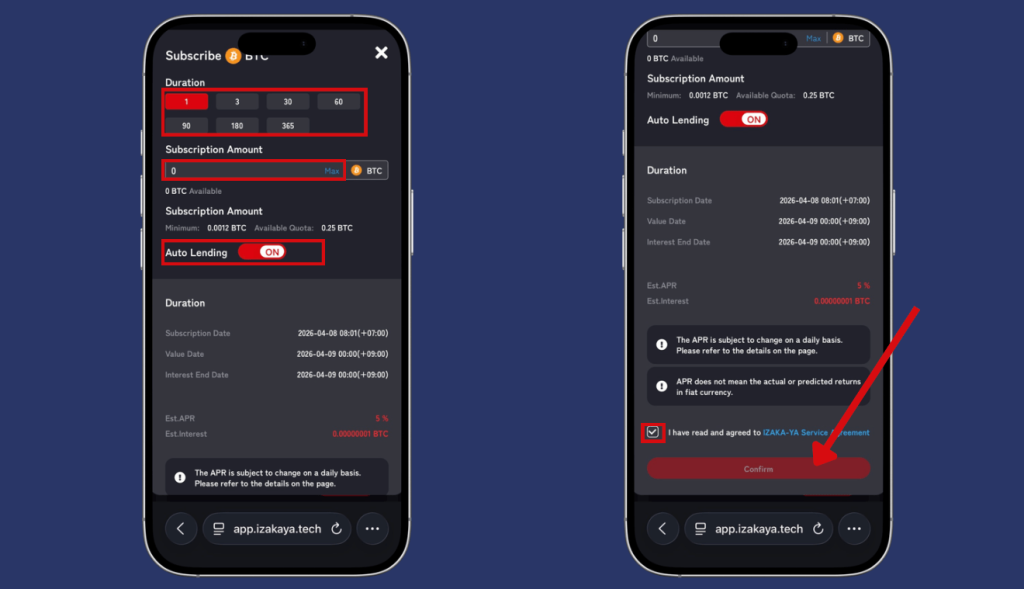
Frequently Asked Questions (FAQ)
A Ledger wallet is used to securely store cryptocurrency private keys offline. It helps protect crypto assets from online attacks and exchange-related risks.
Yes. A single Ledger wallet can secure thousands of different coins and tokens at the exact same time.
Your crypto lives on the blockchain, not inside the physical device. Your PIN code prevents anyone else from using the device, and your secret recovery phrase allows you to recover your accounts on a new device. You can simply buy a new device and use your 24-word secret recovery phrase to restore your entire portfolio.
The Ledger Nano X includes Bluetooth support and mobile connectivity, while the Nano S Plus is a more affordable USB-only option.
Exchanges are convenient, but you do not fully control your crypto there. A Ledger wallet gives you direct ownership and custody of your assets.


