

Keeping cryptocurrency on an exchange may feel convenient, but convenience often comes with risk. Exchange hacks, frozen withdrawals, and platform collapses have shown that trusting third parties with your crypto can quickly become dangerous. This is exactly why hardware wallets became popular in the first place.
What Is a Trezor Wallet?
A Trezor wallet is a physical hardware device designed to securely store your cryptocurrency private keys offline. Manufactured by SatoshiLabs, Trezor was actually the world’s first crypto hardware wallet and helped pioneer the concept of cold storage for everyday users.
At its core, a Trezor wallet acts like a secure digital vault for your crypto. Instead of storing your private keys on an internet-connected phone or computer, the keys remain isolated inside the hardware device itself. Even if your computer becomes infected with malware or spyware, hackers cannot directly access your funds because sensitive operations happen inside the wallet.
When you send cryptocurrency, the transaction must be physically confirmed on the device. This extra verification step creates a strong barrier against remote attacks. Without the physical device in hand, unauthorized transfers cannot be approved.
For many crypto investors, using a hardware wallet becomes the first major step toward true self-custody.
Is Trezor a Cold Wallet?
A Trezor cold wallet keeps your private keys completely offline, which dramatically reduces exposure to internet-based threats. This is one of the biggest differences between hardware wallets and software wallets.
With a hot wallet, your keys are usually stored on an internet-connected device. While this makes transactions quick and convenient, it also increases vulnerability to:
- Malware
- Phishing attacks
- Fake browser extensions
- Remote hacking attempts
- Clipboard hijacking malware
A Trezor wallet works differently. Even when plugged into a computer, the private keys never leave the secure environment inside the device itself.
For example, imagine your laptop is infected with malware designed to steal crypto. If you were using a standard browser wallet, attackers might be able to intercept your private keys or trick you into signing malicious transactions. With Trezor, however, the wallet signs transactions internally, and you must manually verify the transaction details directly on the device screen before approving anything.
This separation between the internet and your private keys is what makes cold storage wallet so powerful.
Why Hardware Wallets Matter More Than Ever
Crypto has evolved far beyond simply buying Bitcoin and holding it on an exchange. Today, investors interact with DeFi protocols, NFT marketplaces, staking platforms, and cross-chain ecosystems daily. While this creates more opportunities, it also creates significantly more security risks.
Many crypto losses today happen because users accidentally:
- Connect wallets to malicious websites
- Approve dangerous smart contracts
- Fall for phishing links
- Download fake wallet apps
- Store seed phrases insecurely
Hardware wallets like Trezor help reduce these risks because they require physical confirmation for sensitive actions.
Even experienced crypto users increasingly rely on hardware wallets as their portfolios grow larger. The difference between protecting a few hundred dollars and protecting a life-changing amount of crypto becomes very significant.
If you are still exploring different wallet types before moving into cold storage, our guides on MetaMask Wallet, Trust Wallet, and Coinbase Wallet can help you understand how software wallets compare to hardware solutions like Ledger wallet.
Exploring the Top Trezor Models
Trezor offers several devices to fit different security needs and budgets. Whether you are holding stablecoins like USDC or securing your assets after doing market analysis on ADA and Ethereum, picking the right hardware is essential.
Here is a clear breakdown of how they compare, followed by insights into which device is right for you.
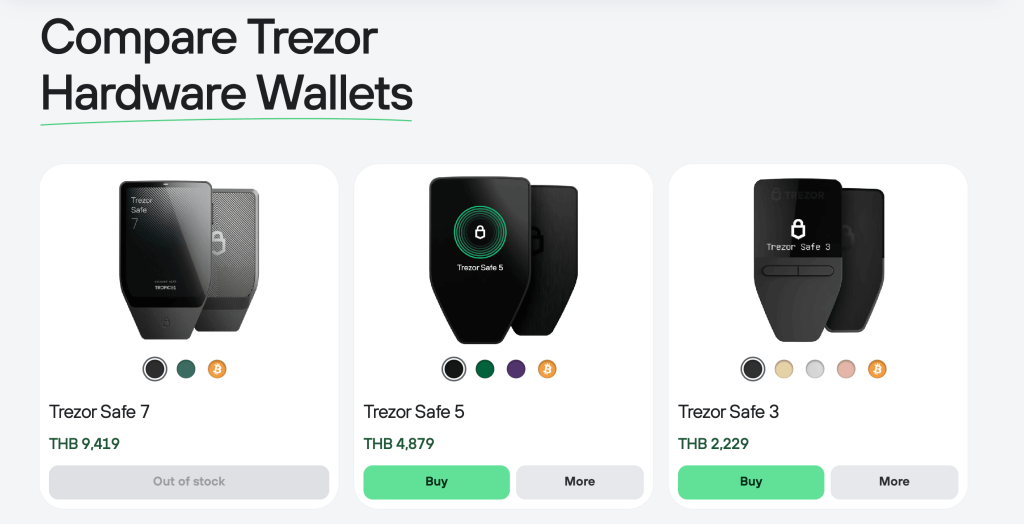
At a Glance: Feature Comparison
| Feature | Trezor Safe 3 | Trezor Safe 5 | Trezor Safe 7 |
| Price | $59 | $129 | $249 |
| Navigation | Two physical buttons | Touchscreen with Haptic Feedback | Touchscreen with Haptic Feedback |
| Build & Durability | Durable Plastic | Extra-durable Plastic & Gorilla Glass | Aluminum Unibody, Gorilla Glass, IP67 Water/Dust Resistant |
| Mobile Compatibility | Full Android / Limited iOS | Full Android / Limited iOS | Full Android / Full iOS |
Deep Dive: Which Model is Right for You?
Trezor Safe 3: The Entry-Level Guardian
The Safe 3 provides robust, uncompromising security at an incredibly accessible price. By utilizing a traditional two-button navigation system and a simple black-and-white screen, Trezor keeps the cost low without sacrificing core protective features like the industry-standard EAL6+ Secure Element chip.
- Who it is suitable for: This model is perfect for absolute beginners, budget-conscious investors, and long-term “HODLers.” If your strategy is to buy Bitcoin or Ethereum, secure it, and lock the device in a drawer for years without needing to check it constantly, the Safe 3 does exactly what you need for a fraction of the cost.
Trezor Safe 5: The Sweet Spot
Stepping up to the Safe 5 introduces a massive upgrade in daily usability. The inclusion of a vibrant color touchscreen paired with haptic (vibration) feedback makes navigating menus and entering passphrases directly on the device much faster and less tedious than clicking physical buttons. It also features Gorilla Glass for added durability, making it feel more like a modern smart device while keeping your private keys strictly offline.
- Who it is suitable for: This is the ideal middle ground for the average crypto enthusiast, active trader, or DeFi user. If you frequently sign transactions, move assets around weekly, or simply want a smoother, frustration-free user experience, the Safe 5 justifies its price tag through pure convenience.
Trezor Safe 7: The Ultimate Powerhouse
The Safe 7 is Trezor’s most advanced offering to date, completely rethinking what a hardware wallet can do. It boasts a massive 2.5-inch high-resolution touchscreen wrapped in a premium, water-resistant aluminum body. More importantly, it untethers you from your computer by introducing Bluetooth connectivity, a built-in battery with wireless charging, and full integration with Apple iOS devices. Under the hood, it pioneers future-proof security with a quantum-ready dual-chip architecture.
- Who it is suitable for: The Safe 7 is tailor-made for high-net-worth investors, tech enthusiasts, and mobile-first users. If you manage your portfolio primarily from an iPhone while on the go and want top-tier, luxury security that feels like a premium smartphone accessory, the Safe 7 is the ultimate, no-compromises choice.
Trezor Wallet vs Ledger: Which Should You Choose?
Now that we have explored the top three Trezor models, it is time to compare Trezor with its biggest rival, Ledger wallet. These two hardware wallet giants have dominated the crypto security space for years, and the debate between them continues among investors today. While both offer strong protection for digital assets, they take noticeably different approaches when it comes to security philosophy, user experience, and ecosystem design.
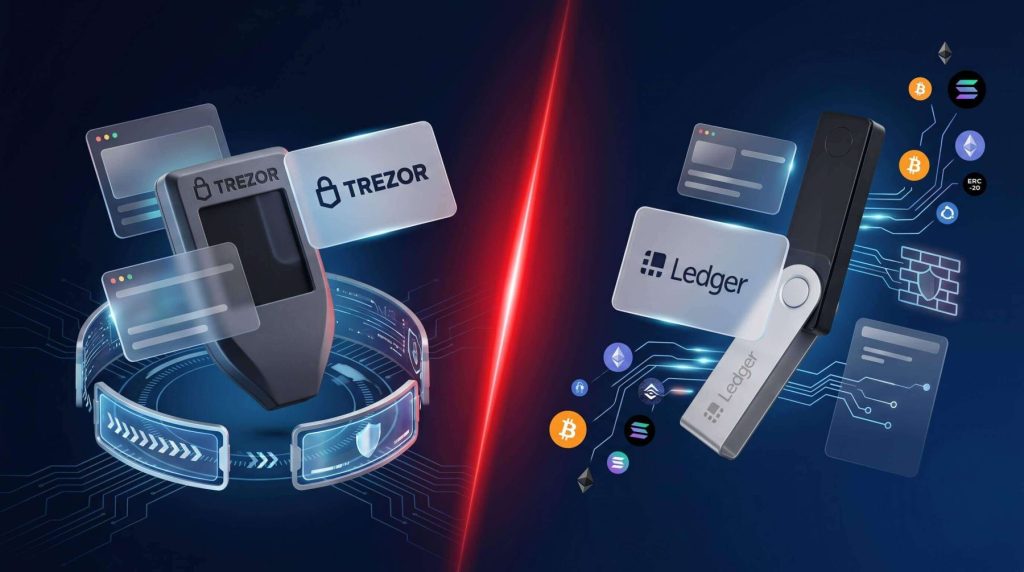
| Feature | Trezor | Ledger |
| Software Philosophy | Fully open-source | Partially closed-source |
| User Interface | Touchscreens on premium devices | Button-based navigation on most models |
| Ecosystem | Trezor Suite | Ledger Live |
| Security Approach | Transparency-first | Secure chip architecture |
| Best For | Open-source advocates | Mobile-focused users |
One reason many users choose Trezor is transparency. Because much of the software is open-source, the broader crypto community can independently review the code for vulnerabilities.
Ledger, meanwhile, often appeals to users who prioritize mobile convenience and broader ecosystem integration.
For beginners who are still learning how crypto wallets work, jumping directly into self-custody can sometimes feel overwhelming. Platforms like IZAKA-YA offer a more beginner-friendly entry point by allowing users to store, swap, and lend assets within a simpler ecosystem before transitioning into advanced self-custody solutions like hardware wallets.
Supported Coins: What Can You Store?
Before buying any hardware wallet, checking token compatibility is extremely important.
Trezor supports thousands of cryptocurrencies across multiple blockchain ecosystems, including:
- Bitcoin (BTC)
- Ethereum (ETH)
- Solana-compatible assets through integrations
- ERC-20 tokens
- Stablecoins
- Litecoin (LTC)
- Cardano (ADA)
- Polygon tokens
However, not every blockchain is supported natively.
Is Ondo Supported on Trezor Wallet?
Yes. ONDO functions as an ERC-20 token on Ethereum, meaning it can be securely stored and managed through Trezor-compatible Ethereum accounts.
Users can interact with ONDO through Trezor Suite or supported third-party wallet integrations while still maintaining cold storage protection.
Is Vechain Supported on Trezor Wallet?
No, Vechain (VET) is currently not natively supported by Trezor. This is important because many investors assume hardware wallets automatically support every major cryptocurrency. In reality, compatibility depends on whether the wallet integrates directly with a blockchain network.
If VET represents a large portion of your portfolio, you may need to explore alternative storage options or compatible third-party integrations.
Is Hedera Supported on Trezor Wallet?
Currently, Hedera (HBAR) does not have native support on Trezor devices. HBAR investors often use wallets specifically built around the Hedera ecosystem or hardware wallets that integrate more directly with the network.
As crypto ecosystems evolve, support may expand in the future, but checking compatibility before purchasing remains essential.
A Beginner-Friendly Alternative for Getting Started With Crypto
While hardware wallets like Trezor are trusted for long-term self-custody and strong offline protection, they can still feel intimidating for beginners entering crypto for the first time. Managing recovery phrases, verifying wallet addresses, and interacting with Web3 applications may seem complicated for users who simply want a smoother way to get started.
IZAKA-YA offer a more beginner-friendly alternative for users who are still learning the basics of crypto management. Instead of navigating multiple wallets, exchanges, and DeFi platforms separately, users can store, swap, and lend assets within a more streamlined ecosystem before eventually transitioning into advanced self-custody solutions like Trezor.
Easy Steps to Start IZAKA-YA Lending
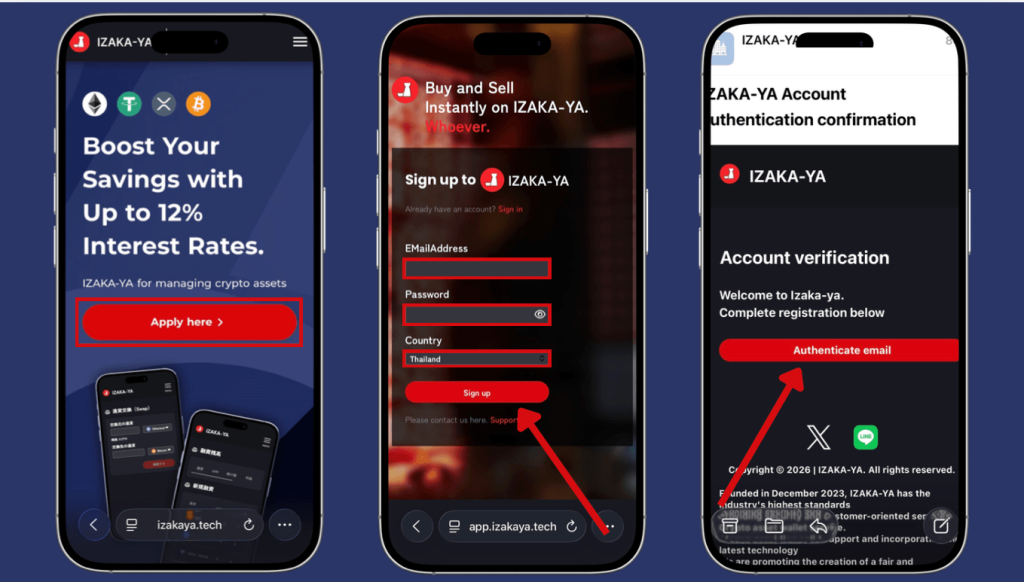
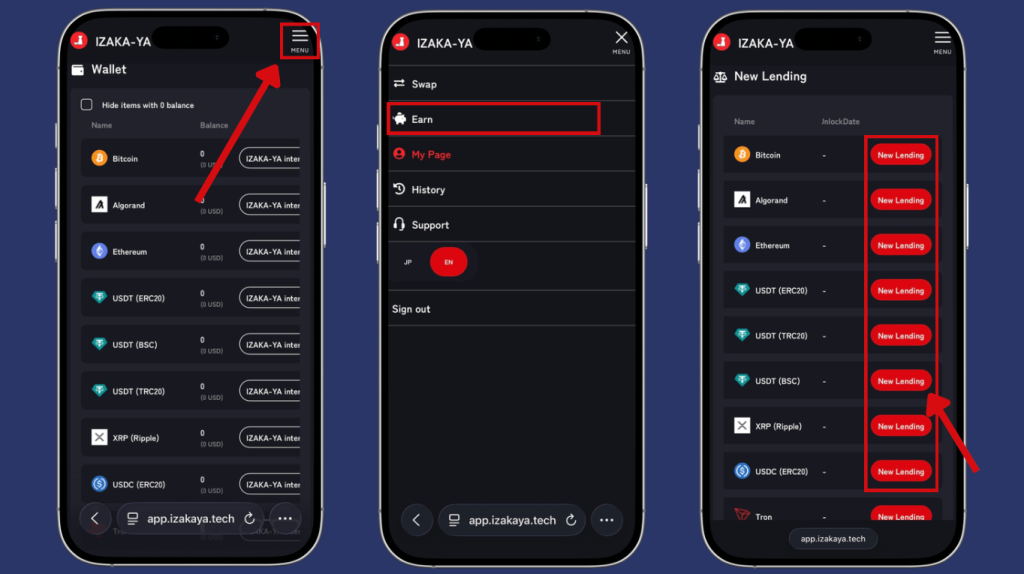
- Step 1: Register for IZAKA-YA
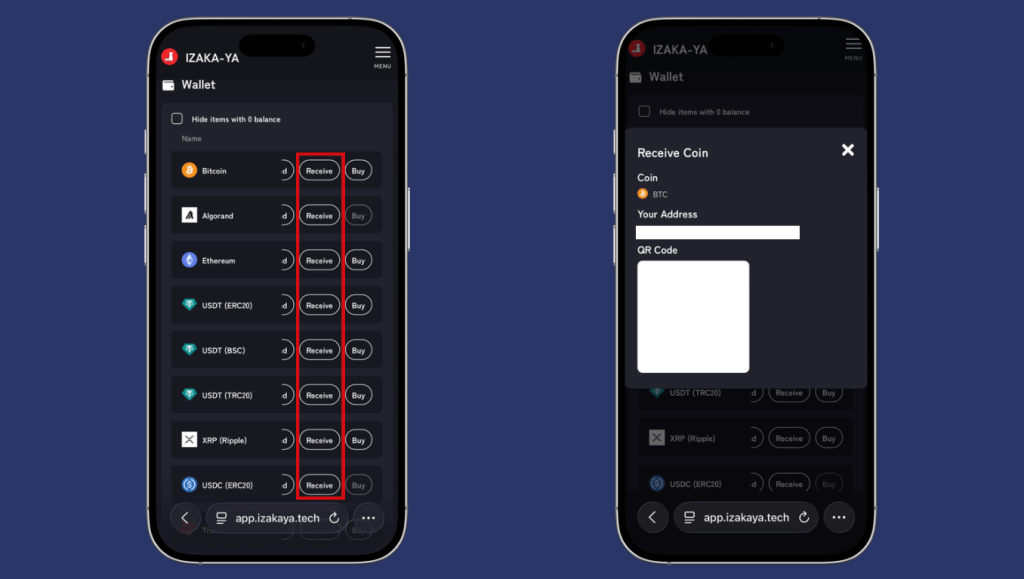
- Step 2: Deposit funds into IZAKA-YA.
- Step 3: IZAKA-YA Lending Guide (Part 1).
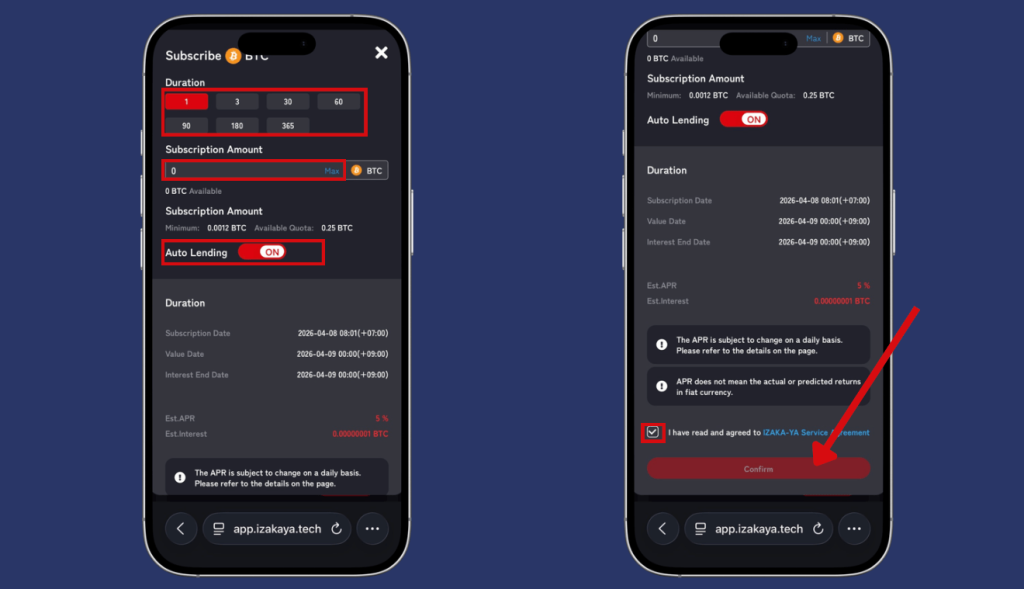
- Step 4: IZAKA-YA Lending Guide (Part 2).
Frequently Asked Questions (FAQ)
Yes. While hardware wallets may initially seem intimidating, Trezor’s setup process and interface are designed to be relatively easy for beginners to follow. The Trezor Suite app simplifies portfolio management and transaction verification considerably.
Your funds are not stored inside the physical wallet itself. They remain on the blockchain. During setup, Trezor generates a recovery phrase that acts as a master backup. If the device is lost, damaged, or stolen, you can restore your wallet on another compatible device using that recovery phrase.
No subscription fees are required to use Trezor wallets. However, normal blockchain network fees still apply whenever you send crypto transactions. These fees go to blockchain validators or miners, not to Trezor.
Yes. Trezor devices can connect to Android smartphones using compatible cables and supported applications. Mobile compatibility may vary depending on the specific model and operating system.
In most cases, yes. Exchanges control your private keys on your behalf, meaning you rely entirely on the platform’s security and solvency. A Trezor wallet gives you direct ownership and control over your crypto assets.


