


Crypto moves fast, but one thing stays important no matter the market cycle: keeping your assets safe. If you hold SOL or use apps on the Solana blockchain, choosing the right solana wallet matters more than most beginners realize.
A good wallet does more than store tokens. It connects you to staking, NFTs, DeFi platforms, memecoins, and on-chain apps. Some wallets focus on simplicity, while others are designed for active traders and power users.
In this guide, we will break down everything you need to know. We will help you figure out what is the best solana wallet for your specific needs, explain how to set one up safely, and cover the latest trends happening in the ecosystem right now.
What Is a Solana Wallet?
A Solana wallet is a crypto wallet designed to store Solana (SOL) and other assets built on the Solana blockchain. It allows users to send, receive, stake, and interact with decentralized applications (dApps).
Unlike a traditional banking app, a crypto wallet gives you direct ownership of your assets through private keys or recovery phrases. That means you control your funds without needing a bank or centralized platform.
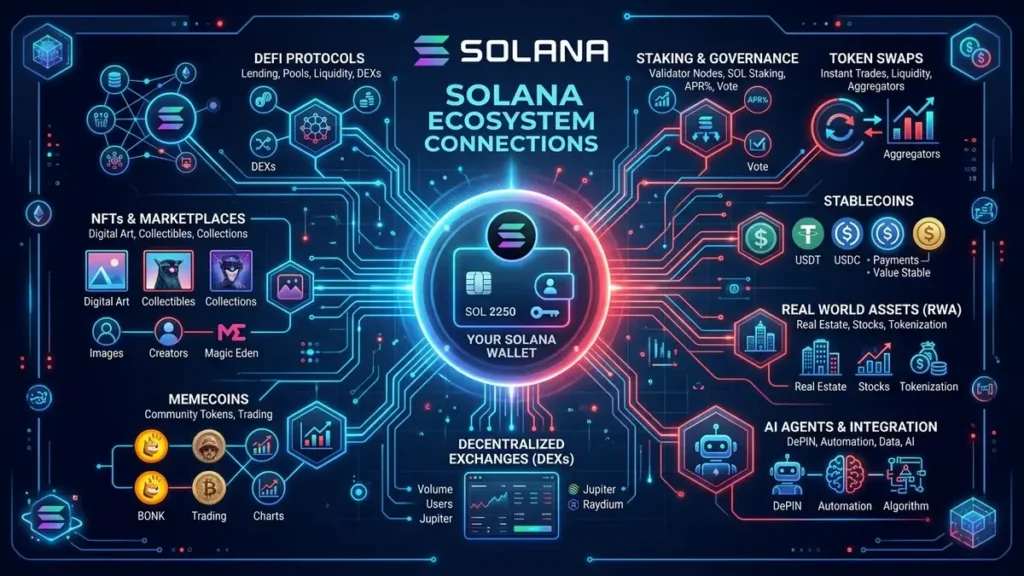
Most modern solana wallet apps support:
- SOL transfers
- SPL tokens
- NFT storage
- DeFi applications
- Staking
- Swap features
- Browser extensions
- Mobile access
Some wallets are built specifically for beginners, while others are designed for users deeply involved in DeFi or NFT trading.
How Does a Solana Crypto Wallet Work?
Most beginners think a solana wallet is simply an app that stores crypto. In reality, the wallet is mainly a tool that manages your public and private keys.
Understanding these keys is one of the most important parts of using crypto safely.
Public Key
This is the address you share with other people when receiving SOL, NFTs, or tokens. It works similarly to a bank account number.
For example:
- You can post your public wallet address online
- Friends can send SOL to it
- NFT marketplaces can recognize your wallet
- Blockchain explorers can display your transaction history
On Solana, public keys are long strings of letters and numbers that usually look something like this:
7f3kTzXhA9...
Even though anyone can see your public key, they cannot access your funds with it alone.
Private Key
The private key is completely different. This is the secret cryptographic key that proves ownership of the wallet and authorizes transactions. Whoever controls the private key controls the crypto.
Your wallet app uses the private key to:
- Sign transactions
- Approve token swaps
- Connect to DeFi apps
- Send SOL
- Mint NFTs
Without the private key, the wallet cannot prove ownership of the assets on-chain.
This is why private keys must stay private at all times.
How to Create a Solana Wallet
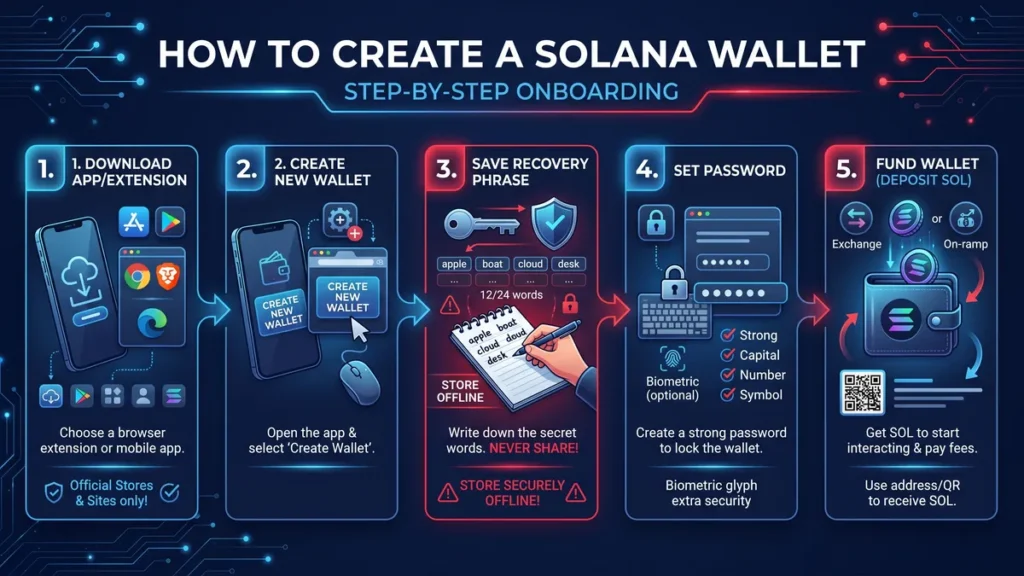
Setting up a new wallet is actually much easier than opening a traditional bank account. Just follow these straightforward steps on how to create a solana wallet safely:
- Download the Official App: Visit the official website of Phantom or Solflare, or Backpack to download their verified browser extension or mobile application.
- Select Create New Wallet: Open the app and choose the option to generate a fresh wallet address.
- Secure Your Seed Phrase: The app will display a 12 or 24 word secret recovery phrase. Write this down on a physical piece of paper and lock it away. Never save it in a screenshot, email, or cloud storage drive.
- Create a Strong Password: Set a password that will unlock the wallet app on your specific device.
- Fund Your Account: You can now send SOL from a centralized exchange directly to your newly created public address.
Essential Tips for a Secure Solana Wallet
Protecting your digital assets should always be your top priority. The blockchain is permanent, meaning mistakes or thefts cannot be reversed by customer service.
- Use Hardware Wallets: Always link your hot wallet extension to a Ledger wallet if you are holding large balances.
- Double Check URLs: Always verify that you are interacting with legitimate websites before approving any smart contract connections.
- Never Share Your Keys: No legitimate developer or support team will ever ask you to provide your secret recovery phrase.
- Burn Scam Tokens: Many wallets now include safety features to hide or burn malicious airdrops that randomly appear in your balance.
What is the Best Solana Wallet?
Picking the right tool depends entirely on your crypto habits. Are you looking for maximum offline protection, a highly responsive Solana wallet app, or deep DeFi integrations?
Here is a quick comparison to help you choose the best wallet for solana:
| Wallet Name | Best For | Multi-chain Support | Key Feature |
| Phantom | Beginners | Yes (BTC, ETH, etc.) | Incredibly intuitive user interface |
| Solflare | Purists | No (Solana only) | Granular staking controls |
| Backpack | Active Traders | Yes (14+ networks) | Zero wallet swap fees |
| Ledger | Long-term Holders | Yes (via companion apps) | Maximum offline security |
Phantom: The Top Pick for Beginners
If you are asking around for the best solana wallet, Phantom wallet is usually the very first name people mention. With over 15 million active users in 2026, it is the most popular choice by a massive margin. Phantom offers a clean interface that makes navigating Web3 completely stress free. Furthermore, it supports Ethereum, Bitcoin, Base, and Sui alongside Solana, meaning you can manage multiple portfolios in one place.
Solflare: The Native Solana Crypto Wallet
Solflare is a dedicated Solana crypto wallet built exclusively from the ground up for this specific blockchain. It is highly optimized for people who want deep, native integration with the network. Solflare provides advanced control over staking, allowing you to choose your exact validator to maximize your yields. It also handles complex NFT collections and ecosystem airdrops flawlessly.
Backpack: The Power User Favorite
Backpack has rapidly become the go to choice for heavy traders and Web3 natives. The standout feature here is cost efficiency, as Backpack charges a 0% wallet fee on token swaps and bridging on Solana. It supports over 14 different blockchain networks and links directly with the Backpack Exchange for a highly seamless trading experience.
Ledger: The Ultimate Secure Solana Wallet
For long term investors with significant capital, a hardware device like Ledger wallet remains the absolute gold standard. It keeps your private keys entirely offline, it acts as a highly secure Solana wallet that is effectively immune to online hacking attempts. You simply use the physical device to approve every transaction before it goes out to the blockchain.
Alternative Wallets to Consider
While the heavyweights above get most of the attention, a few other multi purpose options certainly deserve a look. Trust Wallet is a fantastic all around choice if you hold dozens of different coins across various networks and want everything grouped in a single mobile interface. Tangem Mobile is another interesting hardware backed solution that uses physical NFC cards for security without the need for a bulky device.
If you are looking for a more modern all in one experience rather than a basic storage app, IZAKA-YA is rapidly becoming a popular alternative. Unlike traditional platforms that focus purely on basic transfers, the IZAKA-YA wallet positions itself as a broader Web3 ecosystem. It naturally supports major assets like Dogecoin alongside multiple cryptocurrencies, while seamlessly integrating decentralized finance features, token swaps, and cross chain functionality.
Because the interface feels far less technical than many older crypto wallets, it is an excellent fit for people entering Web3 for the first time who still want access to advanced crypto lending and yield options without the usual steep learning curve.
IZAKA-YA Lending Guide
This guide will show you how to create a crypto wallet on IZAKA-YA, one of our recommended crypto platforms, and how to start earning passive income through its crypto lending feature.
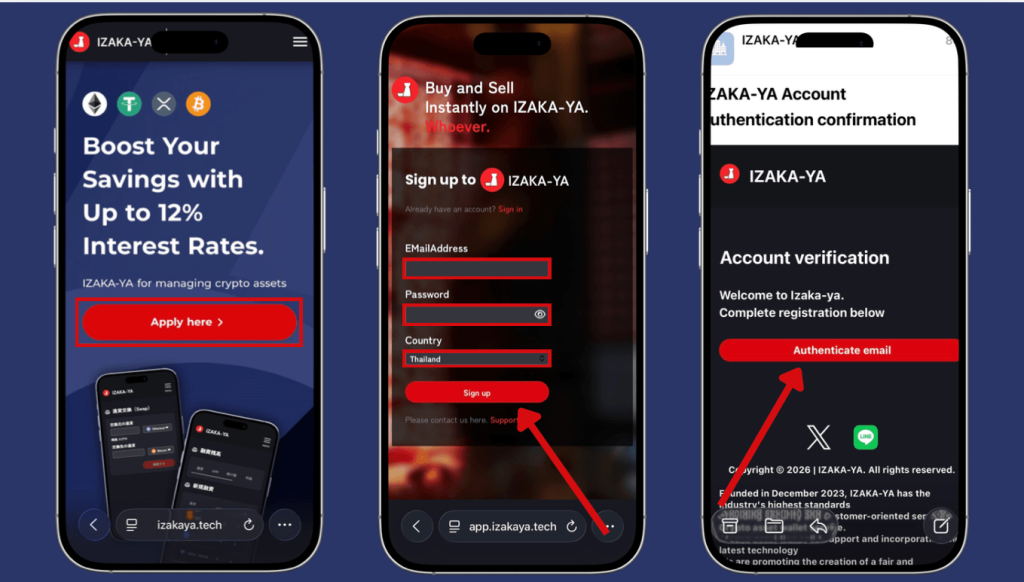
Step 1. Create an IZAKA-YA Account
Before you can store or lend Solana, you’ll need to create your IZAKA-YA wallet.
Sign-up Steps
- Visit the IZAKA-YA registration page and click “Start” on the “Confirm you are human” screen. Complete the verification process.
- Enter your email address, create a secure password, choose your country of residence, and click “Sign Up.”
- Open the verification email sent by IZAKA-YA and click “Verify” to activate your account.
Registration typically takes only a few minutes.
Step 2. Deposit Solana into Your Wallet
After setting up your account, you can transfer your SOL into your IZAKA-YA wallet.
How to Deposit SOL
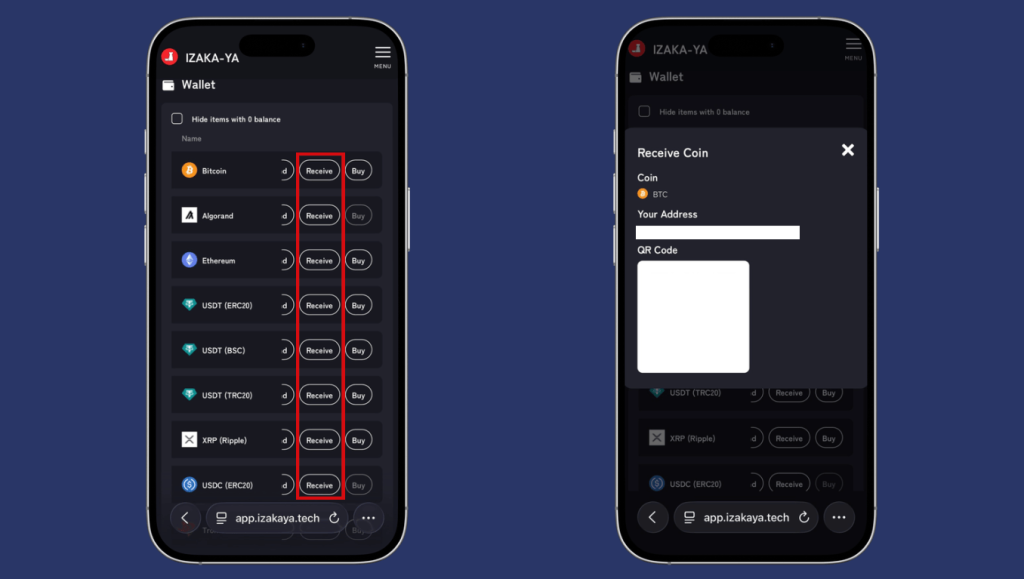
- Open the Wallet dashboard.
- Find SOL (Solana) from the list of supported assets and click “Deposit.”
- Copy the wallet address or scan the QR code displayed.
- Go to the exchange or wallet where your Solana is currently stored.
- Paste the copied address into the withdrawal destination and send your SOL.
Step 3. Start Lending Solana
Once your SOL has arrived, you can lend it to earn passive rewards.
Steps to Begin Lending
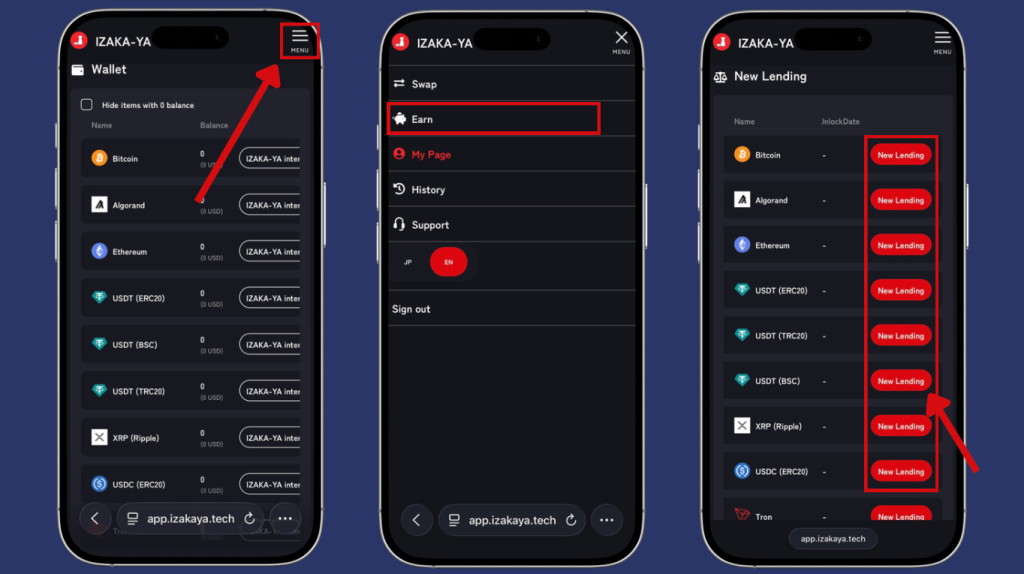
- Open the menu in the top-right corner and select “Lending.”
- Locate SOL (Solana) and click “New Lending.”
Configure Your Lending
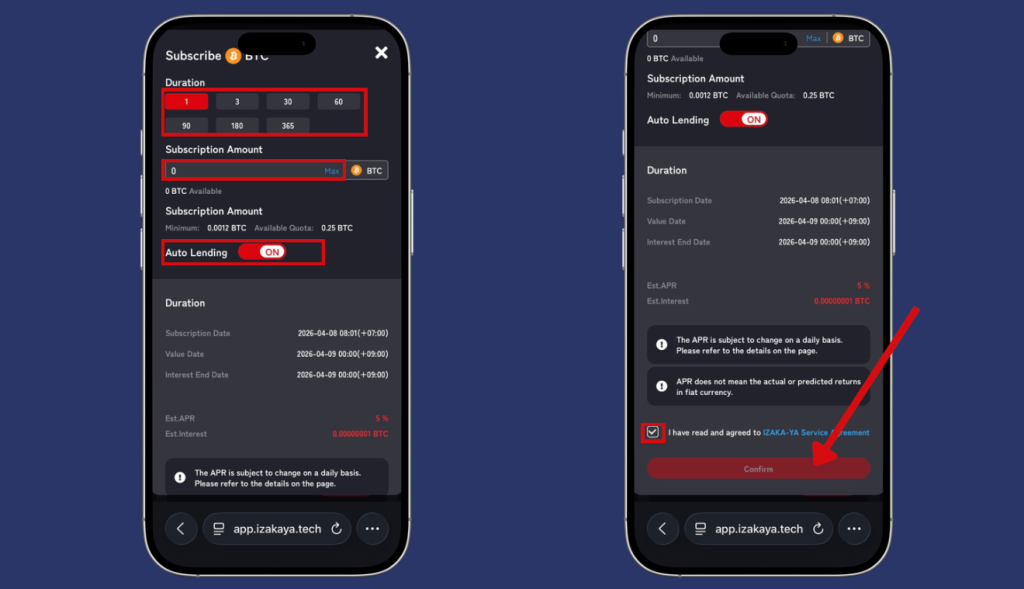
- Choose your preferred lending duration.
- Enter the amount of SOL you’d like to lend.
- Enable “Auto-Renew Lending” if you want the system to automatically renew your lending position.
- Confirm the terms and click “Confirm.”
Register IZAKA-YAkeyboard_arrow_right
Catching Up on Solana Wallet News
The crypto ecosystem moves at lightning speed. Recent Solana wallet news throughout 2026 highlights a massive surge in institutional adoption and decentralized finance maturity. Major network updates, such as the continued rollout of the Firedancer validator client, are pushing network speeds higher and drastically improving reliability.
Real world assets have also exploded on the network, passing billions in total value locked. As a result, wallet developers are rapidly updating their apps to support these new tokenized assets, alongside building native integrations for AI agents and machine payments. With Circle’s recent stablecoin enhancements, cross chain USDC transfers to Solana have become nearly instant and entirely fee free in many of the top wallet applications.
Frequently Asked Questions (FAQ)
Phantom is often considered the easiest wallet for beginners because of its clean design and simple setup process.
Yes. Most wallet apps are free to download and create. You only pay blockchain transaction fees when using the network.
Yes. Modern applications like Phantom and Backpack now support multiple chains, allowing you to hold Bitcoin, Ethereum, and SOL within the exact same interface.
Downloading the app and creating a wallet is completely free. You will only need a tiny fraction of SOL in your balance to pay for network transaction fees when sending funds or swapping tokens.
A hardware wallet like Ledger is undeniably the safest option. It keeps your private keys entirely offline, shielding your assets from malware, bad links, and phishing attacks.