


Taking the first step into crypto storage can feel overwhelming at first. You might be holding some coins on an exchange and wondering what the next logical move should be. Understanding how to get a crypto wallet is the most crucial skill for taking true ownership of your funds. Let us break down exactly how you can set up secure storage today.
What Is a Crypto Wallet?
A crypto wallet is a tool that stores the private keys needed to access your cryptocurrency on the blockchain. Contrary to popular belief, your coins are not physically stored inside the wallet. Instead, the wallet allows you to securely send, receive, and manage your assets.
Custodial vs. Non-Custodial Wallets
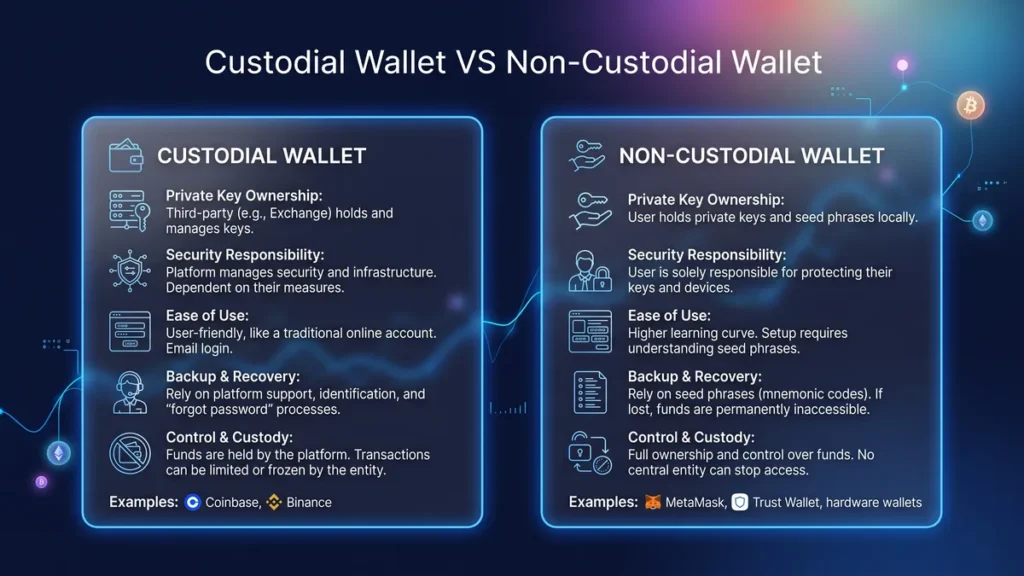
The most important distinction in crypto storage is the legal and technical reality of who controls the private keys. Your private key is the cryptographic proof that you own the digital assets on the blockchain.
Custodial Wallets: Third-Party Control
A custodial wallet is managed by an external company, typically a centralized exchange like Coinbase or Binance.
When you deposit funds into a custodial wallet, the exchange holds the private keys in their institutional security systems. You simply access your funds using a standard username, password, and two-factor authentication.
✅ Pros of Custodial Wallets:
- Easy Recovery: If you forget your password, you can reset it via customer support or identity verification.
- Convenience: The interface is identical to a standard banking app or stock brokerage, making it ideal for beginners.
- Fiat Onramps: They offer the easiest way to convert traditional money (fiat) into crypto and back again.
‼️ Cons of Custodial Wallets:
- Counterparty Risk: Your funds are only as safe as the provider. If the exchange goes bankrupt (like FTX) or gets hacked, you can lose everything.
- Censorship Risk: The provider can freeze your account, block withdrawals, or restrict your funds at their discretion or due to regulatory orders.
Non-Custodial Wallets: Self-Sovereignty
A non-custodial wallet (also called self-custody) generates your private keys locally on your device. The wallet provider only supplies the software interface; they never possess your keys, and they cannot access your funds.
You prove ownership through a Secret Recovery Phrase (often called a seed phrase), a master list of 12 to 24 randomized words.
✅ Pros of Non-Custodial Wallets:
- True Ownership: You are immune to exchange bankruptcies and withdrawal freezes. Only you authorize transactions.
- DeFi Access: You need a non-custodial wallet to interact directly with decentralized finance (DeFi) protocols, NFT marketplaces, and Web3 applications.
- Privacy: They do not require Know Your Customer (KYC) identity verification to set up.
‼️ Cons of Non-Custodial Wallets:
- Total Responsibility: There is no “forgot password” button. If you lose your recovery phrase and your device breaks, your funds are permanently lost.
- Phishing Risks: You are entirely responsible for verifying the authenticity of smart contracts and avoiding malicious links.
Types of Non-Custodial Wallets: Hot vs. Cold
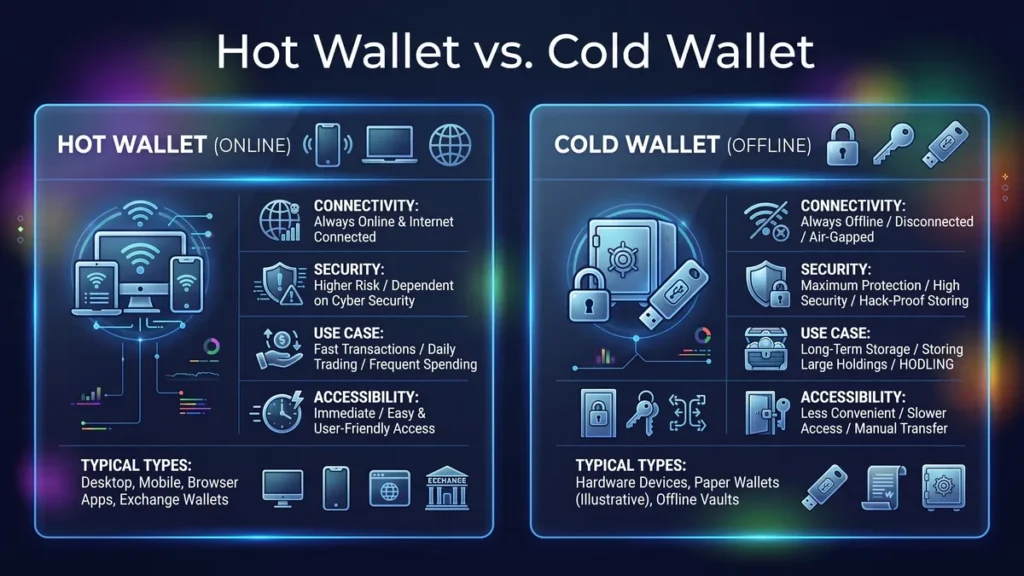
If you choose a non-custodial setup, you must then decide how your private keys are physically stored relative to the internet.
Hot Wallets: The “Checking Account”
When you install a wallet like MetaMask Wallet on your browser or Trust Wallet on your phone, the software generates your private keys and encrypts them locally on your device’s hard drive. When you want to swap a token or buy an NFT, the wallet uses your internet connection to instantly communicate with the blockchain.
Because your private keys are encrypted in the memory of an online device (your phone or computer), hot wallets are incredibly fast. You can sign a transaction and execute a trade in seconds.
However, this constant internet connection creates a vulnerability. If your computer downloads malware or falls victim to a sophisticated online attack, hackers can potentially extract your keys or trick the interface into signing malicious transactions.
🚀 Best for: Daily trading, interacting with DApps, and holding smaller amounts of crypto you intend to use regularly.
Cold Wallets: The “Vault”
Cold wallets prioritize security over speed by keeping your private keys entirely offline (air-gapped). The most common type is a hardware wallet which is a physical device that looks like a USB drive (e.g., Ledger or Trezor).
When you want to send crypto, you must physically plug the hardware wallet into your computer or connect it via Bluetooth. The transaction is signed inside the offline device. The only thing sent back to your internet-connected computer is the finalized cryptographic signature.
Because the private keys never touch an internet-connected operating system, cold wallets are virtually immune to remote hacking, viruses, and malware.
🚀 Best for: Long-term holding (HODLing) and securing large amounts of wealth or your life savings.
💡 Most experienced crypto users utilize a hybrid approach. They keep a small balance on a centralized exchange walletfor easy fiat conversion, use a hot wallet with limited funds for daily Web3 interactions, and secure the vast majority of their net worth in an offline cold wallet.
Here is a comprehensive comparison matrix that puts every major crypto wallet architecture side by side. This master table makes it easy to evaluate how custodial options, non-custodial hot and cold wallets stack up against each other across the most important dimensions.
(Immune to remote hacks)
Feature
Custodial (Exchange) Wallet
Non-Custodial Hot Wallet
Non-Custodial Cold Wallet
Control of Private Keys
Third-party exchange
User (stored digitally)
User (stored physically)
Internet Status
Always online
Always online
Entirely offline
Security Level
⭐️⭐️ ⭐️ (Relies on platform)
⭐️⭐️ ⭐️ (Vulnerable to malware)
⭐️⭐️ ⭐️⭐️⭐️
Setup Cost
Free
Free
$50 to $200+
Ideal Use Case
Beginners and cashing out to fiat
Daily decentralized finance (DeFi) trading
Long-term secure wealth storage
Examples
Binance, Coinbase, Kraken
MetaMask, Trust Wallet, Rabby
Ledger, Trezor, SafePal
How to Get a Crypto Wallet in 5 Simple Steps
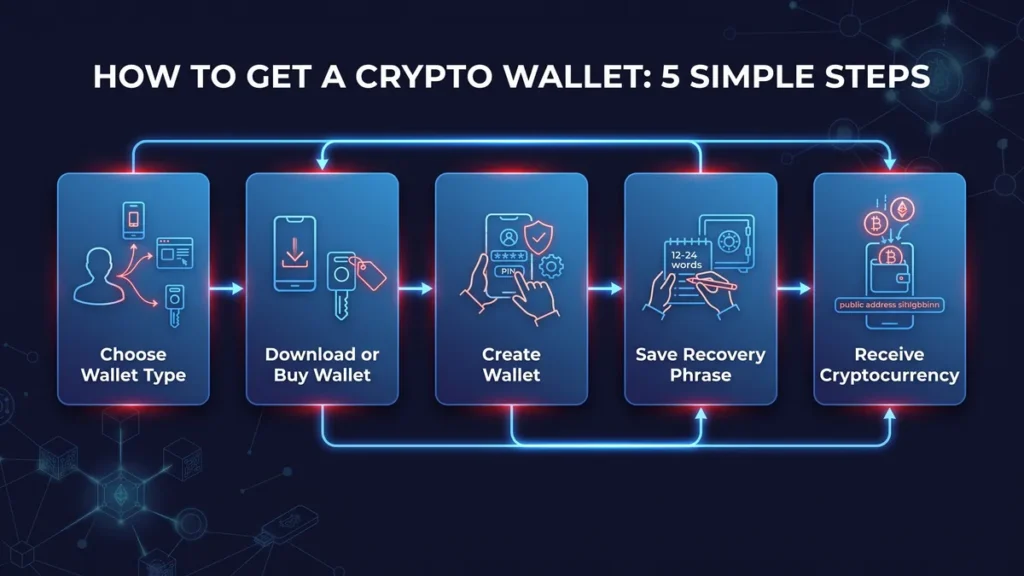
Setting up a crypto wallet is the first step toward taking true ownership of your digital assets. While the specific screens might look different depending on which wallet you choose, the core process is universally the same.
Here is exactly what to expect and how to secure your setup properly.
Step 1: Choose Your Storage Type
You generally have three main choices when looking for a wallet: custodial wallet, non-custodial hot wallet, and non-custodial hot wallet
Think about how you plan to use your crypto before choosing a wallet. If you’ll be buying and selling regularly, a software wallet is often enough. If you’re investing for the long term, a hardware wallet may provide greater peace of mind.
Step 2: Download or Purchase Your Wallet
If you want a hot wallet, you can download a browser extension or a mobile app from an official provider. If you are wondering how to get a cold wallet for crypto, you will need to buy a physical device directly from the manufacturer website. Never buy a hardware wallet from a third party vendor to avoid security risks.
After downloading the software or receiving your hardware wallet, simply follow the installation instructions on your device.
Step 3: Create Your Wallet
After opening the application, you’ll usually see two options: create a new wallet or import an existing one.
If this is your first wallet, choose Create New Wallet.
The wallet will then generate your unique private keys along with a recovery phrase, sometimes called a seed phrase. This phrase usually contains 12 or 24 randomly generated words.
At this point, your wallet has been successfully created, even though you haven’t deposited any cryptocurrency yet.
Step 4: Secure Your Recovery Phrase
Your recovery phrase is essentially the master key to your wallet. If your phone is lost, your computer crashes, or your hardware wallet stops working, you can restore access to your crypto using this phrase.
Write the words down carefully in the exact order shown on your screen. Store them somewhere secure, such as a safe or another location only you can access.
Many wallets will ask you to confirm several words from the recovery phrase before allowing you to continue. This helps ensure you’ve backed it up correctly.
🔐 Set Up Security Features
Before using your wallet, you’ll usually be asked to create a password or PIN.
If you’re using a mobile wallet, you may also have the option to enable biometric authentication, such as Face ID or fingerprint recognition. Remember that your password protects access to the device, while your recovery phrase protects ownership of the wallet itself. Both should be kept secure.
Step 5: Receive Your First Cryptocurrency
Once your wallet is fully set up, you’re ready to receive cryptocurrency.
Open the wallet and select the coin you want to receive, such as Bitcoin or Ethereum. Next, tap the Receive button. Your wallet will display a long string of letters and numbers, along with a QR code.
This string is your wallet address. You can copy the address and paste it into the withdrawal page of a cryptocurrency exchange, or simply let the sender scan your QR code.
A common question from beginners is how to get a crypto wallet address and share it safely. Your address looks like a long string of random letters and numbers such as To find it, open your wallet application and click the “Receive” or “Deposit” button. The app will display your unique address along with a scannable QR code.📗 Locating Your Details: How to find my crypto wallet address
0x507877C2E26f1387432D067D2DaAfa7d0420d90a .
Before confirming any transfer, always verify that you’re using the correct blockchain. For example, Bitcoin should be sent to a Bitcoin address, while Ethereum should be sent to an Ethereum-compatible address. Sending funds to the wrong network may result in permanent loss of your assets.
How to Get a Bitcoin Wallet
Bitcoin remains the most popular digital asset on the market. Many beginners specifically want to know how to get a Bitcoin wallet to store their BTC safely. The process is nearly identical to getting a general crypto wallet. Most modern wallets support Bitcoin by default. You simply choose a reputable provider, download their software, and select Bitcoin from the list of supported assets during setup.
Is Coinbase a Wallet?
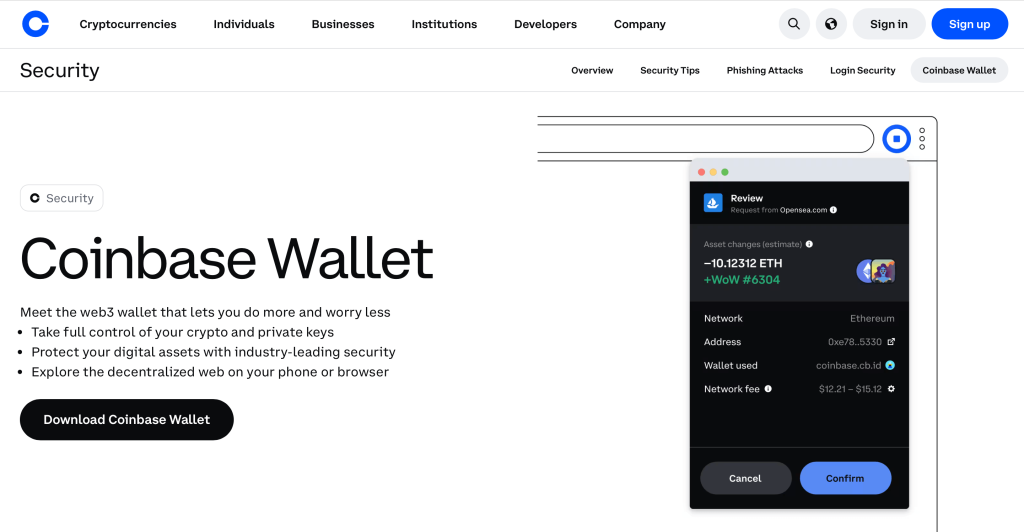
This is a very common point of confusion for newcomers. Is Coinbase a wallet or just an exchange? The answer depends on which service you use. The main Coinbase application is a centralized exchange where the company holds the private keys for you. However, they also offer a separate product called the Coinbase Wallet. This separate app is a true self custody wallet where you have total control over your private keys.
One of The Best Wallets for Beginners: IZAKA-YA
IZAKA-YA is built with beginners in mind, offering a straightforward experience for anyone taking their first steps into cryptocurrency. Instead of overwhelming users with advanced features from the start, the platform focuses on making wallet setup and asset management simple and intuitive.
As you become more comfortable, IZAKA-YA lets you do more than simply store your crypto. You can swap supported tokens and explore earning opportunities without needing to move your assets between multiple platforms, making it convenient to manage everything in one place. Its clean interface and beginner-friendly design also help reduce the learning curve. Even if you’re completely new to crypto, you can start using the wallet with confidence while gradually learning more about the broader blockchain ecosystem.
We’ll walk you through the easy setup steps below, so you can get your wallet up and running in just a few minutes.
Step 1: Register for an IZAKA-YA Account
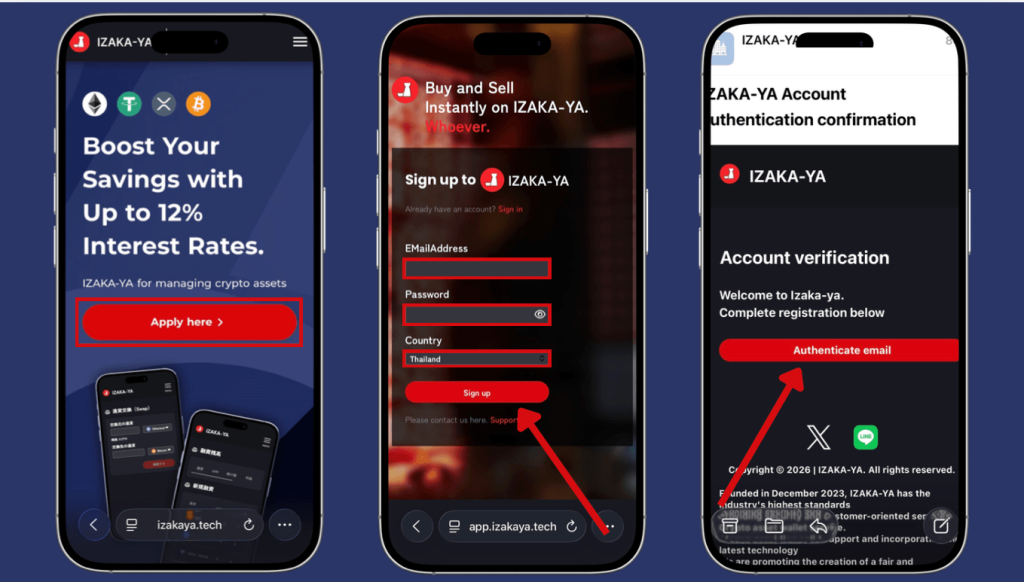
Before you can store or lend your coins, you’ll need to set up an IZAKA-YA account. The process is simple and only takes a few minutes.
How to Register
- Go to the IZAKA-YA registration page.
- Complete the security verification by clicking “Start” on the “Confirm you are human” screen and following the prompts.
- Enter your email address, create a secure password, choose your country or region, and click “Sign Up.”
- Check your email for the verification message from IZAKA-YA and select “Verify” to activate your account.
Step 2: Locate Your Deposit Address
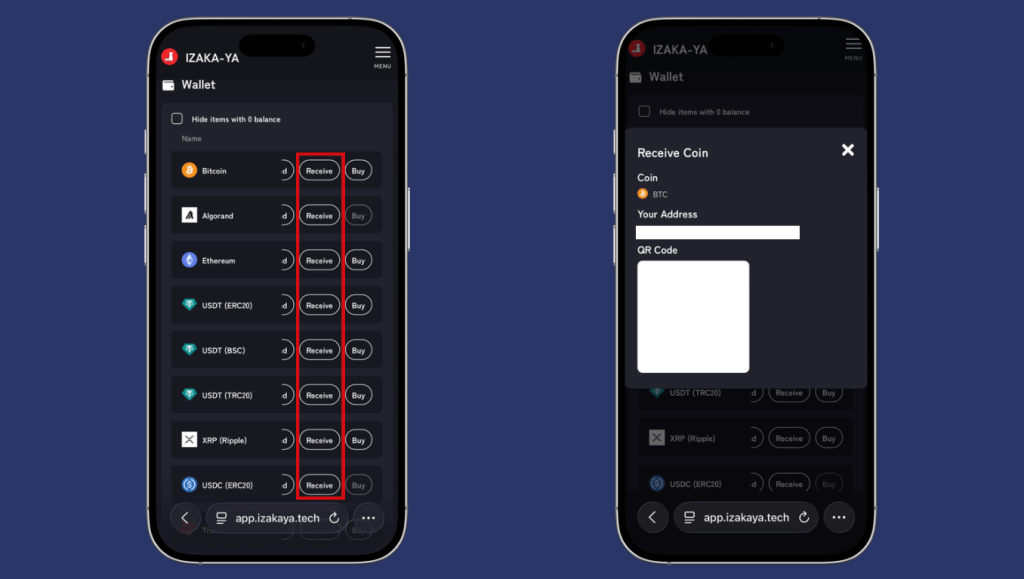
After your account has been activated, the next step is to transfer coin into your IZAKA-YA wallet so you can begin using the platform’s features.
How to Receive
- Open your Wallet dashboard after logging in.
- Browse the supported assets and select the desired coin.
- Click “Receive” to display your wallet’s details.
- Copy the wallet address shown on the screen or use the QR code if you’re transferring from another mobile wallet.
- Go to the exchange or wallet where your coin is currently stored, paste the copied address into the field, and complete the transaction.
Always double-check the details before submitting the transaction.
Step 3: Open the Crypto Lending Page
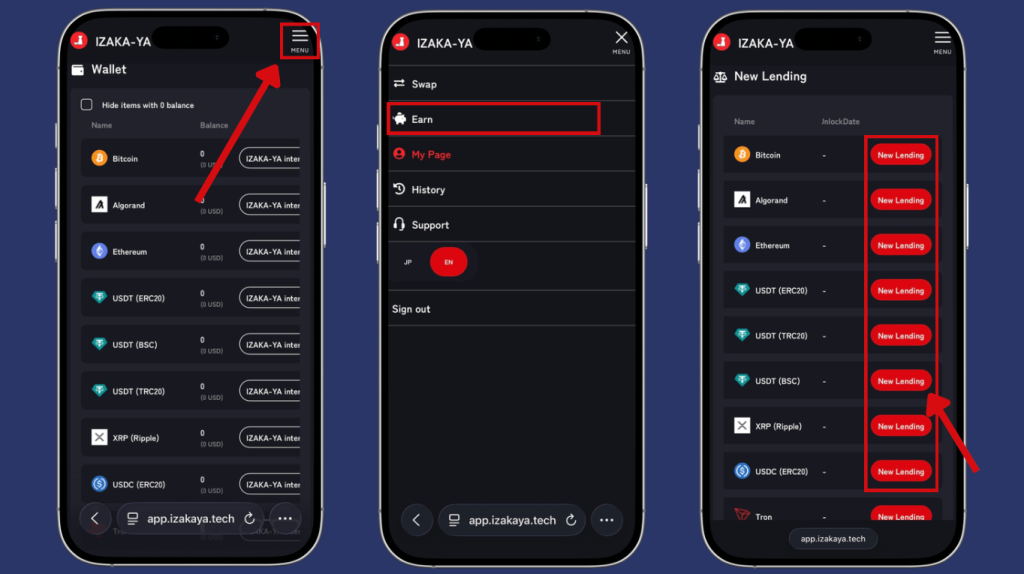
Once your coin arrives in your wallet, you’re ready to enroll it in IZAKA-YA’s Crypto Lending program and potentially earn passive income.
How to Access Lending
- Select the menu icon in the upper-right corner of the platform.
- Choose “Earn” from the navigation menu.
- Find the desired coin in the list of available assets.
- Click the red “New Lending” button to begin creating a lending order.
Step 4: Configure Your Lending Order
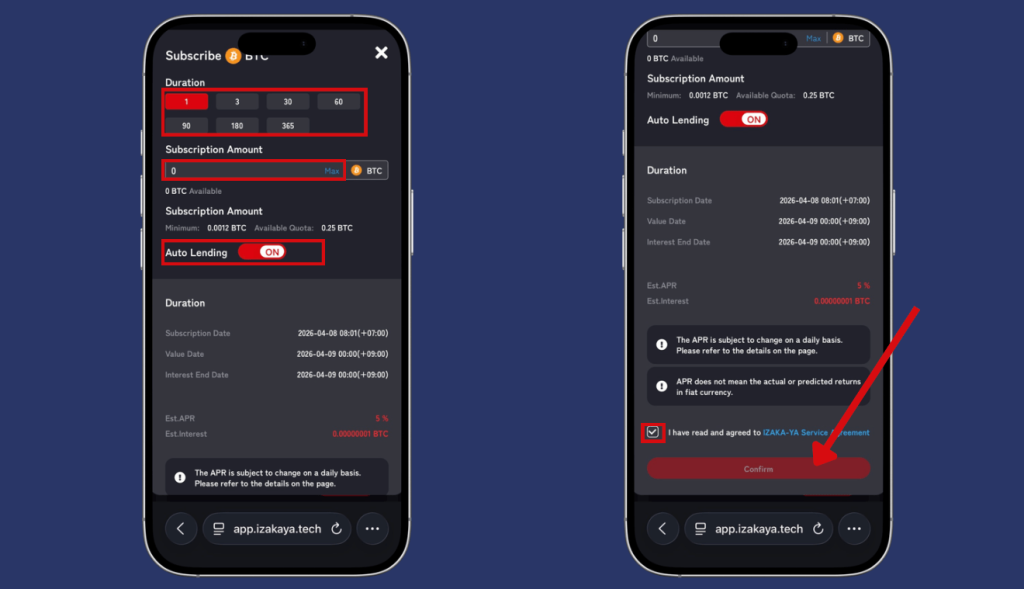
The final step is choosing how you’d like your asset to be lent.
Complete Your Lending Application
- Select the lending duration that best fits your investment goals.
- Enter the amount of asset you wish to lend.
- If you want your funds to automatically enter a new lending term after the current one ends, turn on “Auto-Renew Lending.”
- Review your selections, tick the confirmation checkbox, and click the red “Apply” button to submit your lending request.
Once your application has been processed, your asset will begin participating in the selected lending term according to the platform’s conditions.
Start using IZAKA-YAkeyboard_arrow_right
Frequently Asked Questions (FAQs)
No. Your public wallet address is completely safe to share, much like a bank account number. People can only use it to send you funds, not to withdraw or steal your assets.
No. Most modern hot and cold wallets are multi-chain, meaning they can store Bitcoin, Ethereum, and thousands of other digital tokens all within the same application.
If you lose your recovery phrase, you permanently lose access to your funds. Wallet providers do not store your keys, so there is no customer support team that can reset or recover it for you.
Yes. You can enter your 12 to 24 word recovery phrase into any compatible wallet software on a new phone or computer to instantly access and manage your funds.
It is safe for smaller amounts used in daily trading or decentralized apps. For large amounts or long-term savings, migrating those assets to an offline cold hardware wallet is highly recommended.


