


Getting started with decentralized finance can feel overwhelming, especially if you are used to keeping your cryptocurrencies on centralized exchanges. However, setting up your first wallet does not have to be complicated. Whether you want to buy NFTs, interact with decentralized applications, swap tokens, or simply take greater control of your assets, having a secure crypto wallet is the first step.
This is where MetaMask comes in. Over the years, MetaMask has become one of the most widely used wallets in the crypto industry and serves as the gateway to thousands of Web3 applications. More importantly, it gives users direct ownership of their assets, allowing them to participate in decentralized finance without relying on intermediaries.
In this guide, we will walk you through how to set up a MetaMask wallet step by step, while also covering the security practices that every crypto holder should know before transferring any funds.
What Is MetaMask?
Before downloading anything, it helps to understand what MetaMask actually is and why millions of users rely on it.
MetaMask is a non-custodial cryptocurrency wallet available as both a browser extension and a mobile application. Being non-custodial means that you, and only you, control the private keys associated with your wallet. Unlike centralized exchanges where the platform ultimately holds your assets on your behalf, MetaMask puts you in complete control of your funds.
This distinction is important because ownership in crypto is fundamentally tied to private keys. If a centralized platform experiences financial difficulties, freezes withdrawals, or becomes the target of a cyberattack, users may temporarily lose access to their assets. With MetaMask, your funds remain under your control regardless of what happens to any third party.
At the same time, self-custody comes with greater responsibility. There is no customer support team that can restore your wallet if you lose your recovery phrase. For this reason, understanding wallet security is just as important as learning how to install the application itself.
Before we jump into the setup, it helps to look at where this technology started. If you want a closer look at its history, along with its main advantages and limitations, feel free to explore our dedicated article on the origins, pros, and cons of MetaMask wallet.
MetaMask vs Centralized Exchanges
| Feature | Centralized Exchange | MetaMask Wallet |
| Private Key Control | Platform controls your keys | You control your keys |
| Account Recovery | Email and identity verification | Secret Recovery Phrase |
| Ownership of Funds | Shared trust | Complete ownership |
| Access to Web3 Apps | Limited | Full access |
| Risk Exposure | Platform hacks and freezes | User security management |
For many investors, moving from an exchange platform to MetaMask wallet represents an important step toward becoming a true participant in the decentralized ecosystem rather than simply holding cryptocurrencies passively.
Key MetaMask Wallet Features You Need to Know
Storing tokens is great, but what else can this tool actually do?
The platform has rolled out massive updates over the years, transforming it into a hub for all your crypto activity. Here are the top MetaMask wallet features to look out for:
- Multichain Support: While famous for Ethereum and EVM-compatible chains (like Polygon, Arbitrum, and Binance Smart Chain), recent updates now support non-EVM chains like Solana, Bitcoin, and TRON natively.
- Built-in Token Swaps: You can trade tokens directly inside the interface. The aggregator scans decentralized exchanges (DEXs) to find you the best rate.
- MetaMask Snaps: These are third-party add-ons that expand functionality. Snaps let you connect to almost any major blockchain, receive community-powered security alerts, and even integrate Web3 social media feeds.
- Portfolio Dashboard: A sleek web view that tracks all your assets, NFTs, and transaction history across multiple networks in one place.
- Smart Accounts: A major upgrade that allows for batched transactions (approve and swap in one click) and lets you pay gas fees in tokens other than ETH.
MetaMask Wallet Setup Guide (Step-by-Step)
Step 1: Download the Official MetaMask Wallet
The first step is to download MetaMask from its official website. MetaMask is available on several platforms, making it accessible whether you prefer using a desktop browser or a smartphone.
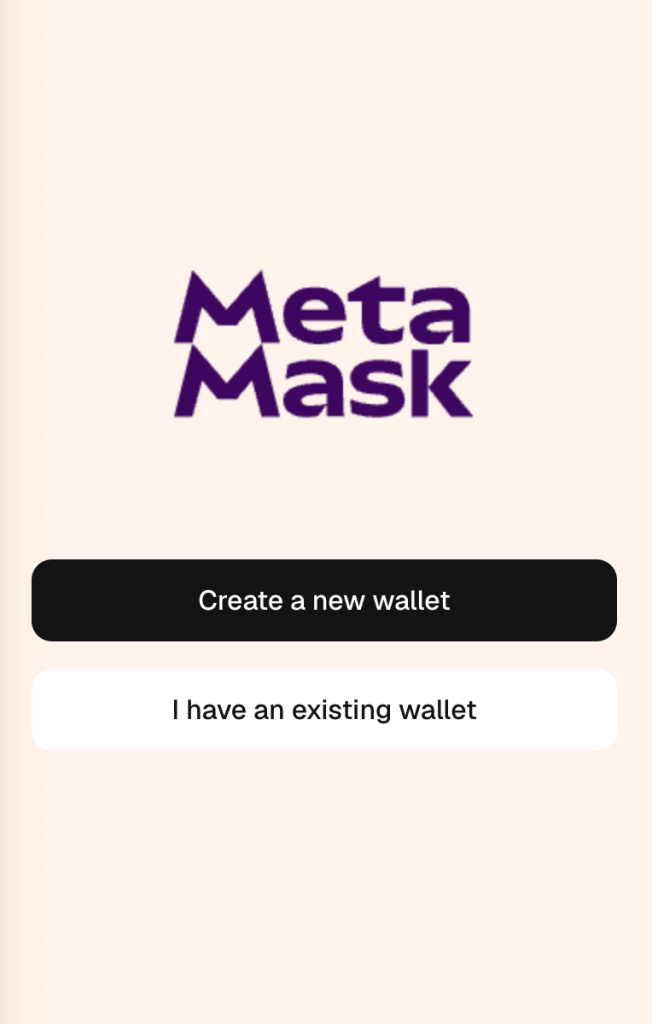
After installing the MetaMask extension or mobile app, open the application. You will be greeted by a splash screen asking if you want to import an existing wallet. To begin your setup, select the option clearly marked ‘Create a new wallet’.
Step 2: Create Your MetaMask Wallet
You will now choose between the traditional self-custody method or the modern convenience method. This is the most critical decision in the setup process, defining how you own and access your assets.
- Path A: Secret Recovery Phrase (SRP) This is the traditional self-custody method. You will manage a 12-word phrase (your master key) that you must store securely offline. This is maximum security, and you are solely responsible.
- Path B: Social Login (Extension Only) This links your wallet to a social profile, such as Google or Apple. While convenient, this method means your wallet’s security is dependent on both your social account credentials and a new MetaMask password you set.

Path A: Securing the Secret Recovery Phrase
The Secret Recovery Phrase is generated only once and is never shared by MetaMask. Whoever has the SRP has complete control over the assets in a wallet. If you chose this path, click the reveal button to see your unique 12-word phrase. Make sure no one can see your screen. Crucially: Copy the phrase exactly as shown, in the original English language, and do not translate it.
If you lose your SRP, you will lose control of all of those assets as MetaMask cannot recover your wallet. This is why it is extremely important to deliberately store your SRP in a secure location. Tip 1: Write it down. Do not save it digitally. Tip 2: Never use online services, cloud accounts, password managers, or even unencrypted digital notes.Anything connected to the internet can potentially be compromised.
Path B: Social Login (Extension Only)
You have selected your social account. Now you must set a secure password for MetaMask. This password, in combination with your social account, is required to unlock your wallet across your synced devices.
You don’t need to custody a Secret Recovery Phrase (SRP) with this option. Once you have set up your login, the password is synced across all devices where you are logged into that same Google or Apple account.
Do not use any repeated passwords. Use a password manager or your computer to generate a unique, strong, brand-new password that you have never used elsewhere.
Once you create the password, you are ready to begin using MetaMask.
Step 3: Start Exploring Web3

Congratulations! Your MetaMask wallet is now set up. Whether you chose the SRP path or the social login path, you are now ready to interact with decentralized applications, manage digital assets, and explore the future of the web. Remember your security protocols, and enjoy the decentralized world.
For investors looking to generate passive income from their holdings, IZAKA-YA provides another option for putting idle assets to work while maintaining the principles of self-custody. Its user-friendly interface helps simplify tasks such as creating a wallet, viewing balances, and sending or receiving digital assets.
Can MetaMask Support Other Networks?
Although MetaMask was originally built for Ethereum, it has evolved into a multi-chain wallet capable of supporting numerous EVM-compatible networks.
In addition to Ethereum, users can add networks such as Polygon, Avalanche, Arbitrum, Optimism, and BNB Smart Chain. This flexibility has helped MetaMask remain one of the most versatile wallets in the industry.
As blockchain ecosystems continue to expand, having access to multiple networks allows investors to explore lower transaction fees, faster confirmation times, and a wider range of decentralized applications.
Exploring Other Wallet Alternatives
While MetaMask remains one of the most popular options available, it is far from the only wallet worth considering. Different investors often have different priorities, and understanding the alternatives can help you find the solution that best fits your needs.
Trust Wallet is particularly attractive for mobile users thanks to its clean interface and support for thousands of cryptocurrencies across multiple chains. Beginners often appreciate its simplicity and broad compatibility.
Coinbase Wallet is another beginner-friendly choice that integrates smoothly with the Coinbase ecosystem. Users transitioning from centralized exchanges may find the experience familiar and easy to navigate.
Meanwhile, Phantom has emerged as one of the leading wallets for the Solana ecosystem. Its speed, low transaction fees, and intuitive design have made it a favorite among NFT collectors and active traders.
Ultimately, choosing a wallet is less about finding the “best” product and more about selecting the one that matches your investment style and preferred blockchain ecosystem.
Final Thoughts
Learning how to set up a MetaMask wallet is one of the first and most important steps toward participating in the decentralized world. While the installation process itself only takes a few minutes, understanding the responsibilities that come with self-custody is equally important.
MetaMask offers more than just a place to store cryptocurrencies. It acts as a gateway to decentralized finance, NFT marketplaces, blockchain gaming, and the broader Web3 economy. As more users seek greater control over their digital assets, wallets like MetaMask are becoming essential tools rather than optional accessories.
The key to using MetaMask successfully lies in balancing convenience with security. By safeguarding your Secret Recovery Phrase and remaining vigilant against scams, you can confidently explore everything that Web3 has to offer.
Frequently Asked Questions
Yes. Downloading and setting up MetaMask is completely free. Users only pay network fees when performing transactions on the blockchain.
Yes. If you forget your password, you can reinstall the wallet and recover access using your 12-word Secret Recovery Phrase.
MetaMask natively supports Ethereum and can also connect to other EVM-compatible networks such as Polygon, Avalanche, Arbitrum, Optimism, and BNB Smart Chain.
MetaMask is considered one of the most trusted wallets in the industry. However, its security ultimately depends on how well users protect their recovery phrases and avoid phishing attacks.
Not directly on the Bitcoin network. However, wrapped versions of Bitcoin and assets on EVM-compatible chains can be managed through MetaMask.


